Introduction
Ever think about how crazy fast the internet is nowadays? It’s completely second nature to us now, but if you go back just fifteen or twenty years, loading a single webpage required a massive amount of patience. Let’s look back at the tech ideas that made the web move quicker, saving us from watching images render line by line, like a garage door opening in slow motion.
Today, we expect websites to load the exact millisecond our finger taps the screen. If a page takes even three seconds, we lose interest and click away. Yet, the underlying infrastructure of the web hasn’t radically changed—information still has to physically travel through massive underground cables and cross entire oceans to reach your screen.
But how did we actually get here? It definitely wasn’t a sudden, overnight revolution. What makes today’s web feel so incredibly smooth is really just a massive collection of minor tweaks, clever structural workarounds, and behind-the-scenes optimizations. Let’s break down the clever engineering hacks that quietly saved us from the dial-up days.
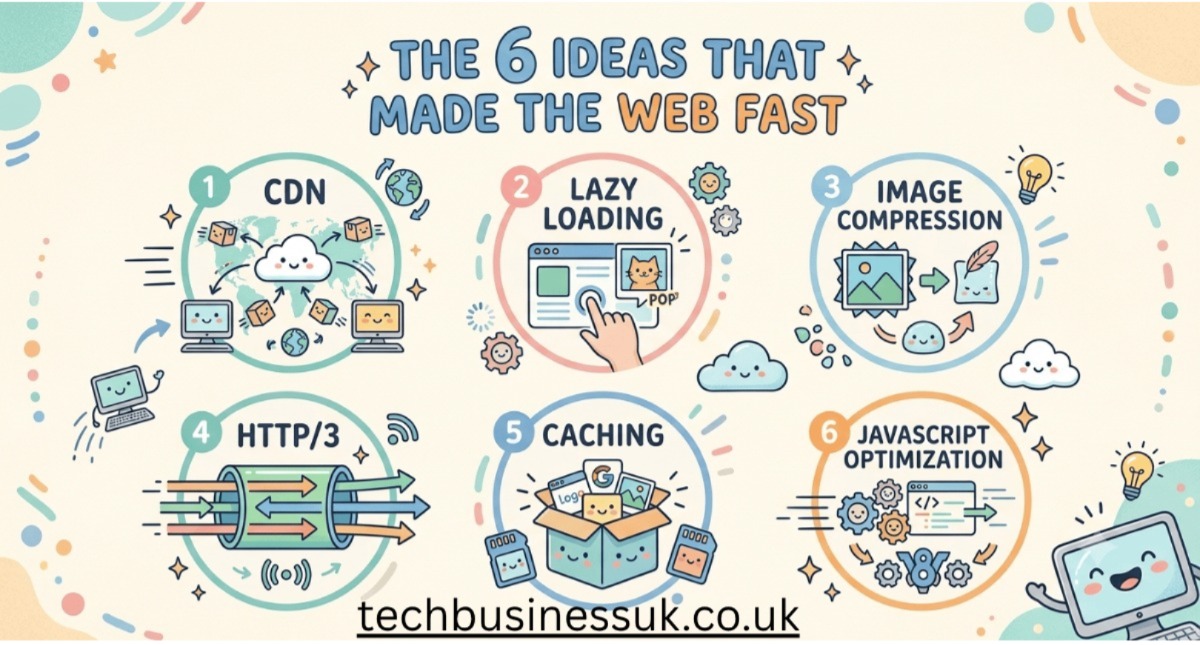
1. Content Delivery Networks (CDNs): Outsmarting Geography
- The Problem: No matter how much you pay for blazing-fast internet, you can’t bypass physics—data can only travel as fast as the speed of light. If you’re sitting in London or Karachi and trying to open a site hosted on a lone server over in Virginia, that data has to travel halfway around the world and back. This constant back-and-forth travel is exactly what causes that annoying lag we call latency.
- How it Works: Look at it this way: imagine if a book publisher made every single person on earth travel to one warehouse in Manhattan just to pick up a novel. It’d be completely impractical. Instead, they ship stock out to local neighborhood bookstores. That’s exactly what a CDN does. It’s a vast global web of local servers that pre-load and store “static” assets—essentially parts of a page that stay the same, like logos, images, and styling sheets.
- Why it Matters: When you load a site backed by a CDN, your device completely skips a transatlantic journey. It just grabs the data from a server down the road. Cutting the physical travel distance from thousands of miles down to just a few means pages pop up without any frustrating delays.
2. HTTP/2 and HTTP/3: Clearing Up Web Traffic
- The Problem: For decades, browsers were stuck using a super old communication standard called HTTP/1.1. It was incredibly stubborn. Your browser could only request one file from a server at a time down a single connection lane. If a website had fifty tiny icons, a couple of fonts, and a massive background image, the large image would clog up the pipeline. All the other elements had to wait their turn—a frustrating digital traffic jam called “head-of-line blocking.”
- How it Works: Engineers completely re-engineered the highways of the web. First came HTTP/2, which introduced “multiplexing.” Instead of one single file crawling down the lane at a time, multiplexing split the connection into dozens of open lanes, allowing the browser to request and download hundreds of files simultaneously. Then came HTTP/3, which shifted the connection style to a system that doesn’t fall apart if your mobile data drops a single packet of information.
- Why it Matters: It completely eliminated data gridlocks. Websites with complex layouts, multiple images, and heavy scripts can now stream all their pieces down to your device at the exact same time, allowing pages to assemble themselves smoothly and instantly.
3. Smart Caching: Saving a Copy For Later
- The Problem: Think about your favorite daily blog or social feed. It’s a total waste of data if your phone has to download the exact same logo, fonts, and site layout every single time you hit refresh. That pointless back-and-forth drains your data plan and puts unnecessary strain on servers.
- How it Works: Think of browser caching as your device’s short-term memory. When you visit a site for the first time, the server sends over the web files with a quick note: “Hey, this logo isn’t changing anytime soon, so go ahead and hang onto it.” Your browser takes that advice and saves a copy right onto your local drive.
- Why it Matters: So when you click back onto that site later, your browser doesn’t even bother asking the internet for the logo. It pulls it right out of your device’s internal storage in literally zero milliseconds. It makes returning to your regular online haunts feel lightning fast because half the page is already sitting on your device.
4. Next-Gen Image Compression (WebP and AVIF): Shifting to Lighter Cargo
- The Problem: Pictures take up an absolute ton of digital real estate compared to basic text or code. We relied on classic JPEGs and PNGs for decades, and they did the job just fine for simpler web pages. But as screens got sharper, trying to load high-res imagery using those old formats meant dealing with bloated file sizes that routinely choked out slower mobile networks.
- How it Works: To fix this, tech companies built entirely new mathematical formulas to compress files, resulting in WebP and AVIF. These files leverage clever predictive algorithms to shed microscopic visual details that our eyes can’t even perceive anyway. The result? The file size plummets, but the image stays completely crisp.
- Why it Matters: Switching to an AVIF or WebP file can easily cut a graphic’s weight in half without making it look like a pixelated mess. Stripping away all that hidden bulk means content-heavy articles and media feeds load almost instantly—plus, you won’t accidentally chew through your entire data plan just from scrolling.
5. Lazy Loading: Fetching Only What’s on Screen
- The Problem: Imagine opening a massive online shopping site or a long news article that contains a hundred different images. In the old days, your browser would refuse to let you interact with the page until it had successfully downloaded every single one of those hundred pictures—even the ones buried all the way at the bottom of the page that you might never scroll down to see.
- How it Works: Lazy loading turns this philosophy on its head. It forces the browser to focus strictly on what you can see right now on your screen. Anything further down the page gets swapped out with lightweight, temporary placeholders.
- Why it Matters: The webpage just loads images on the fly, right before they enter your field of view as you scroll. Since your device isn’t bogged down downloading content you haven’t even reached yet, the initial screen loads instantly, keeping the experience incredibly fluid.
6. JavaScript V8 Engine: Speeding Up the Code
- The Problem: Let’s face it—modern websites aren’t just flat digital flyers anymore. They are actual, complex software apps running right inside your browser, heavily powered by JavaScript. The issue is that parsing and running all that raw code on the fly takes a ton of processing power, which used to make browsers stutter, lag, and lock up entirely.
- How it Works: The magic comes down to the V8 engine Google built for Chrome. Rather than slogging through massive scripts line-by-line while your screen hitches, V8 relies on Just-In-Time (JIT) compilation. It takes the website’s code and instantly translates it into language your computer hardware understands natively. Because it processes everything on the go based on your actual actions, it keeps things running incredibly fast.
- Why it Matters: It takes the heavy lifting off slow processing models. Because your browser can now compile and run script code at hardware speeds, complex web applications like Google Maps, web-based games, and interactive dashboards react to your clicks with zero lag.
The Bigger Picture
What’s cool about all of this is that no single upgrade deserves all the credit. They basically act as a collective unit:
- CDNs shorten the physical distance data has to travel.
- HTTP/3 clears up the digital traffic lanes to prevent gridlock.
- Caching remembers files so you don’t waste data downloading them twice.
- Modern image formats strip out invisible bulk to keep the cargo incredibly light.
- JavaScript engines crunch through heavy software code in milliseconds.
- Edge computing handles the heavy lifting right in your backyard, running actual code on local neighborhood servers instead of faraway data centers.
- Compression acts like a digital vacuum sealer, squeezing files down to the bare minimum before they ever hit the road.
Look at these tweaks individually, and you’re only looking at a savings of a few milliseconds here and there. But the real magic happens when they all run simultaneously—those tiny moments stack up fast. It creates a cumulative effect that makes the modern web feel entirely seamless, a massive, night-and-day shift from the brutally sluggish internet we all just used to tolerate twenty years ago.
What Speeds Up the Web Next?
We’ve successfully streamlined the data pipelines, compressed images, and placed servers right near our neighborhoods. So, what’s the next step to push web speeds even further?
The next boundary to cross is Edge Computing. Right now, CDNs can save static files close to your location, but the moment you do something dynamic—like typing a search query, updating a dashboard, or interacting with an AI tool—that request has to make the full trip back to a primary data center to do the actual computing.
Edge computing changes that by running actual interactive code directly on those local servers right down the street. Imagine a world where the AI model or database processing your request is sitting at a server station just a few blocks away from your house. By moving the actual intelligence of the web closer to the user, we are moving toward a future where the line between a local app on your phone and a massive website on the internet disappears entirely. The web won’t just feel fast—it will feel instant.
Read this too: James Vinson Adams and the Algorithm Shadow: The Fight for a More Human Internet
FAQS
1 If data travels at the speed of light, why do we still experience lag?
Because physics doesn’t care how fast your internet package is. Sure, light travels fast, but routing data through thousands of miles of fiber-optic cables snaking across the ocean floor takes an actual, measurable amount of time. It’s also not a straight shot. Your data has to stop and pass its passport through countless routers, switches, and security firewalls along the way. When a heavy website forces your browser to make dozens of these transatlantic round-trips just to piece a single page together, those microscopic speed bumps aggregate into a very noticeable delay.
2 Will browser caching clog up my phone storage?
Not at all. Browsers are surprisingly aggressive about housekeeping. They don’t just blindly hoard everything you look at; they only clip small, repetitive layout pieces—think brand logos, generic site fonts, and basic CSS styling sheets. Even then, those files have built-in expiration dates. Your browser quietly tosses them in the digital bin the second they get stale so your local drive doesn’t bloat. If you’re still paranoid about it, clearing your entire cache manually takes all of five seconds in your settings menu.
3 Why hasn’t the entire web switched to HTTP/3 yet?
Because updating the foundational infrastructure of the global internet is a logistical nightmare—it’s like trying to repave a highway during rush hour traffic. For HTTP/3 to actually work, it’s not enough for your phone’s browser to get an update. The target web servers, the web hosting platforms, the corporate firewalls, and data centers across the globe all have to rewrite their configurations to handle it. Tech giants with massive engineering budgets swapped over almost immediately, but your average local business site or legacy server network will likely take years to get around to it.
4 Do formats like WebP and AVIF ruin image quality?
Technically speaking, yes. They rely on “lossy” compression, which is just a fancy way of saying they permanently throw visual data away. In reality? Your eyes aren’t good enough to notice. The math behind these formats targets the specific blind spots in human vision, cutting out subtle color gradients and micro-pixels that our brains instinctively filter out anyway. Unless you’re a photographer zooming in 400% on a calibrated studio monitor to color-grade a shot, a WebP file is going to look completely identical to a massive, old-school JPEG—just at half the weight.
5 Is there a catch to lazy loading?
Only if the developer who set it up rushed the job. When it’s poorly coded, or if your cellular connection drops to one bar, the user experience falls apart. You’ll find yourself constantly waiting on images to awkwardly pop or snap into place right as you scroll past them. Even worse, if the site doesn’t specify the exact dimensions of the image placeholders beforehand, the text on your screen will violently jitter and jump around as the real images load in, completely breaking your reading flow.
About the Author