An Application Security (AppSec) team analyzing the risk profile of AI-generated code snippets.
Vibe Coding and the AI Software Supply Chain
The promise of AI-assisted development is undeniable: you write a natural language prompt, watch the code materialize, and ship features. However, as software engineering teams lean heavily into the speed of “vibe coding“—the practice of rapidly prompting generative AI tools and deploying code based on overall “vibes” rather than rigorous manual line-by-line writing—Application Security (AppSec) leads (the engineering specialists responsible for finding and fixing software vulnerabilities) are raising serious alarms about unmanaged GitHub Copilot security concerns. Velocity is a highly valuable engineering metric, but it must never override fundamental security constraints.
We have officially entered the era of the co-authored codebase. Instead of writing code line by line, modern developers now act as prompt editors, and rapidly orchestrate complex software architectures with AI suggestions. While this accelerates overall output, it introduces unvetted, AI-generated components directly into your critical software supply chain (the interconnected network of third-party libraries, packages, and code templates used to build and run your product), forcing teams to confront native GitHub Copilot security concerns before shipping.
The real danger is that large language models naturally optimize for syntactic plausibility rather than structural safety. They write code that looks clean, runs locally, and compiles successfully, yet operates on highly insecure foundations. Without strict guardrails, organizations adopting AI tools are simply compiling massive security debt at an unprecedented velocity.
⚖️ Speed vs. Safety
- Velocity: An agile engineering metric that measures how fast a team can deliver value to production.
- Velocity = Speed of delivery
- Security Debt: The long-term business cost of launching insecure code quickly now to save time by skipping thorough verification.
Demystifying the 40% Vulnerability Metric
You have likely seen the shocking headline claiming that nearly forty percent of AI-generated code is insecure. This specific statistic originates from a landmark study by the NYU Tandon School of Engineering, and it has heavily shaped current GitHub Copilot security concerns. However, to manage AI risk realistically, we must look past the sensationalism and understand the actual science of how this test was conducted.
The researchers did not simply scan standard, everyday code completions. Instead, they intentionally designed 89 high-risk development scenarios and fed Copilot prompts directly associated with MITRE’s Top 25 Weakness Enumerations (CWEs)—a standardized, community-driven dictionary of known software vulnerabilities. They wanted to see if the AI would bypass classic traps like SQL injections and Cross-Site Scripting (XSS) (a vulnerability where attackers inject malicious client-side scripts into trusted web applications to execute in the victim’s browser) when explicitly steered toward those vulnerable contexts.
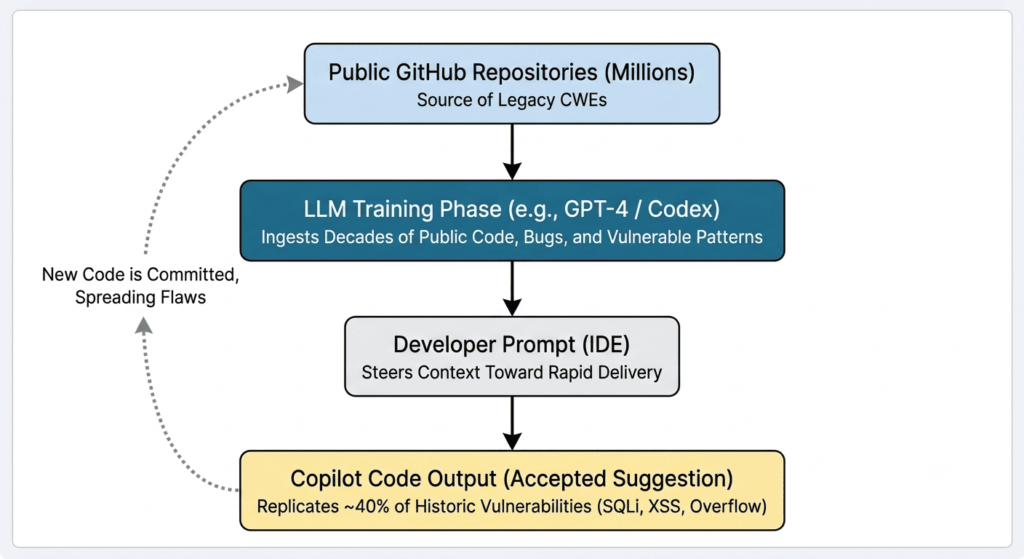
Under these extreme conditions, the AI recommended insecure code in roughly 40% of the completed programs. This failure highlights a core structural issue: Copilot does not have an innate understanding of safety; it simply predicts the most statistically probable next token. Because its LLM training data is built from millions of public repositories—many containing legacy bugs—it naturally mirrors those historical vulnerabilities.
Exacerbating the situation is the psychological trap known as automation bias. When developers see perfectly formatted code executed without errors, they fall into an over-reliance loop. They bypass the manual review, and typically pass it to a junior developer, meaning critical flaws can go straight into production.
What’s Next? Understanding the math behind the risks is only the first step. To shield your repositories, you must understand exactly how these vulnerabilities manifest in day-to-day code. Let’s pull back the curtain on the three specific, high-risk exploits currently hijacking AI-assisted commits…
The 3 Biggest GitHub Copilot Security Concerns
Evaluating how automated assistants work in real-world situations reveals the regularity of slipping through some vulnerabilities in developer reviews. If your team does not actively intercept these patterns, your pipelines are vulnerable to 3 key threat vectors.
To help your team focus on defence, these are three primary GitHub Copilot security concerns that significantly affect modern codebases:
- The Reintroduction of Legacy Vulnerabilities (CWEs): AI models often suggest outdated, insecure design patterns.
- Hardcoded Secrets and Spreading API Keys: LLM code completion tools often output plaintext credentials, and connection strings directly in active workspaces.
- AI Package Hallucinations and Slopsquatting: AI tools often recommend plausible-sounding software packages that do not exist. Attackers exploit this by registering harmful clones on public registries.
1. Reintroducing Legacy Code Weaknesses (CWEs)
Large language models are historical reflection engines; they do not know what secure code is, only what code is most common. Because the vast public datasets used to train these models are filled with decades of legacy code, the AI frequently defaults to outdated, vulnerable programming habits.
By prioritizing simplicity over modern secure coding standards, the AI routinely outputs snippets that contain classic Common Weakness Enumerations (CWEs). These include SQL injections, Cross-Site Scripting (XSS), and buffer overflows. If your developers rely on these snippets to save time, they end up copy-pasting vulnerabilities that security teams have worked to eliminate for the past twenty years.
2. Hardcoded Secrets and Spreading API Keys
The rapid pace of AI-assisted development makes managing sensitive credentials extremely difficult. Since developers prompt models to quickly integrate third-party APIs (such as OpenAI, database connectors, or cloud providers), the AI naturally generates code templates that include hardcoded connection strings and placeholder variables.
This trend has led to a massive surge in exposed credentials. According to the landmark GitGuardian State of Secrets Sprawl report—an annual security index that monitors millions of public commits to track exposed API keys and corporate credentials—commits involving AI assistants leaked secrets at an alarming rate of about 3.2%. This is more than a double the rate of 1.5% for human-only commits. This shows that AI-accelerated workflows pose a much higher risk for credential exposure.
The root cause is a massive code volume combined with developer oversight. AI-assisted commits are often much larger, sometimes containing up to twice as many lines of code as traditional commits. Developers quickly check core application logic but may overlook generated configuration files, Model Context Protocol (MCP) setups (an open standard that allows AI assistants to securely connect to local databases and developer tools), or deployment manifests, where the hardcoded secrets actually reside.
3. AI Package Hallucinations and Slopsquatting
One of the most unusual yet dangerous security threats from generative AI is package hallucination. Since LLMs work on statistical probabilities rather than live database checks, they can confidently create software libraries, APIs, and import paths that do not exist in any public registry.
Attackers have turned this quirk into an exploit method called “slopsquatting”—a specialized security threat where hackers register malicious packages under names they predict AI models will confidently hallucinate. Malicious actors monitor LLM behavior, train their systems to identify commonly hallucinated package names, and then register those exact names on registries like npm, PyPI, or NuGet.
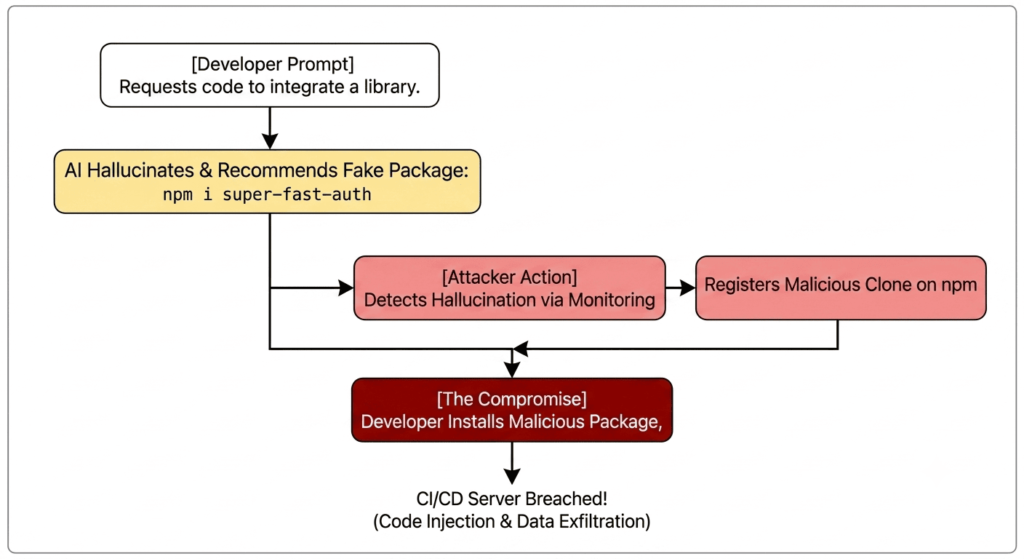
Once the malicious package is active on a public registry, the next developer who runs the AI’s suggested install command may accidentally introduce malicious code to their development machine or build server. This turns a minor AI hallucination into a serious supply chain breach.
What’s Next? Understanding how these technical exploits work is important, but how do they affect your business from a legal and audit standpoint? In the next section, we will look at the compliance and intellectual property risks of letting AI assist in creating your proprietary products…
Enterprise Compliance & Intellectual Property (IP) Risks
While technical exploits like SQL injections and leaked secrets pose immediate threats, the legal and compliance consequences of unmanaged AI output can quickly harm a business. When AI models create code from public repositories, they carry complex, hidden legal issues into your commercial software.
It’s essential for any organization to understand these compliance challenges when trying to navigate modern GitHub Copilot security concerns. You want to avoid getting tangled in regulatory or copyright problems.
The GPL “Copyleft” Licensing Threat
Large language models learn from extensive public datasets that include hundreds of thousands of open-source projects. Many of these projects come with strict “copyleft” licenses, such as the GNU General Public License (GPL). These licenses require that any derivative work must also be made open-source.
This creates a significant liability risk known as license contamination. If GitHub Copilot generates a notable, unique piece of GPL-licensed code and a developer unknowingly adds it to a proprietary, closed-source product, the business could technically violate the original license terms.
This exact issue has led to major legal disputes, particularly the Doe v. GitHub class-action lawsuit. This case involves intense appeals focusing on copyright management issues and breaches of open-source licenses. For tech firms, the lack of automatic attribution in AI suggestions means developers risk facing legal troubles with every significant code completion they accept.
Data Leakage: Individual vs. Enterprise Tiers
A primary compliance worry for CTOs is the security of their own IP: Is our private, proprietary codebase being sent to the cloud to train public models? The answer depends on the license tier your developers are using.
Under the Copilot Individual tier (including the new Free tier), GitHub’s default terms allow the system to collect prompts, telemetry, and accepted suggestions to enhance the public model—unless the developer consciously chooses to opt out in their settings. If an engineer working on a highly confidential algorithm uses a personal account, it’s easy for your company’s proprietary IP to end up in the public training pool.
In contrast, the Copilot Business and Enterprise tiers are specifically designed to address these data leakage concerns. These commercial tiers ensure that your prompts and generated suggestions are never stored, never used to train public models, and are backed by commercial intellectual property indemnity clauses.
Impact on SOC 2 and Compliance Frameworks
Shipping software to enterprise clients typically requires passing thorough third-party audits, like SOC 2 Type II or ISO 27001. These security frameworks require you to show a strict chain of custody, code provenance, and secure review practices for everything running in your production environment.
🔒 Enterprise Compliance Definitions
- SOC 2 (System and Organization Controls): An audit framework testing how securely a cloud or software platform manages and protects sensitive client data.
- SOC 2 Type I: Confirms your security controls are designed correctly at a single point in time.
- SOC 2 Type II: Tests your controls over a continuous period (typically 3 to 12 months) to prove they actively work in daily operations.
- ISO 27001: An international security standard that certifies a company has a robust, globally recognized system for managing software and operational risks.
Unmonitored generative AI disrupts these compliance workflows. Auditors expect to see clear, human-reviewed pull requests and validated dependency trees. Injecting thousands of lines of unverified AI code with unknown origins makes it incredibly tough to pass an audit.
If your development team cannot verify whether a generated block of code was created, copied, or mixed with open-source licenses, your compliance documentation will fall apart. To keep your security certifications, your team must set up active, automated guardrails to audit every AI suggestion before it hits your main branch.
What’s Next? Understanding the technical and legal risks is just part of the challenge. To build a highly secure engineering team, you need to move from fear to proactive defense. In the next section, we will provide you with practical, actionable strategies—including configuring a .copilotignore file and setting up automated CI/CD scanners—to secure your workspace….
Actionable Mitigation: How to Use Copilot Securely
Proactive planning is the only way to safely integrate AI tooling without risking your intellectual property or security posture. When establishing defensive guidelines to mitigate GitHub Copilot security concerns, you must combine native platform settings with external automated scanners and human code reviews.
You cannot rely on a single security layer. To safely adopt co-authored software development, your engineering team should implement these 4 practical guardrails immediately.
1. Activating GitHub Content Exclusion
There is massive confusion in the developer community around configuring .copilotignore files in local IDEs.Although some community plugins help with this, the only reliable method to stop Copilot from indexing sensitive code, raw schemas, or .env templates is through GitHub’s official Content Exclusion system.
Organization administrators can configure these exclusion paths directly on GitHub.com under their enterprise or org-level Copilot settings.
This setup ensures that specified directory patterns are completely blocked from Copilot’s contextual reach across all connected IDEs (VS Code, Visual Studio, and JetBrains). If a developer accidentally opens an excluded file, Copilot immediately disables its completions, shielding your proprietary logic or connection strings from being sent to the cloud.
2. Enabling Built-In Duplication Detection Filters
To reduce the legal and copyright licensing risks discussed in previous sections, companies must enforce the native block list. GitHub Copilot has a built-in “suggestions matching public code” filter that scans suggestions against public repositories on GitHub.
When this filter is set to “Block,” the extension runs a real-time check against its index of public open-source code. If the generated suggestion matches a sequence of roughly 150 characters of public code, Copilot automatically suppresses the output, completely preventing copyleft license leaks from affecting your commercial builds.
3. Deploying Automated CI/CD Guardrails
Native filters are useful, but they must be backed by independent verification engines inside your continuous integration and continuous deployment (CI/CD) pipelines. By treating AI-generated code as untrusted input, you can use automated tools to block vulnerable commits before they are built.
The table below outlines how to balance built-in Copilot settings with specialized security scanners:
| Threat Vector | Built-In Copilot Control | Independent CI/CD Guardrail |
|---|---|---|
| Insecure Code & CWEs | Copilot Autofix (Beta) / Filter blocks | Semgrep / Snyk: Scans for exploits like SQLi and XSS on every PR. |
| Leaked Credentials | Content Exclusion / Local setting blocks | TruffleHog / GitGuardian: Flags hardcoded secrets in commit histories. |
| License Contamination | Public Code Duplication Filter | FOSSA / Black Duck: Conducts open-source license audits on dependencies. |
| Context Leaks / Telemetry | Organization-level telemetry opt-out | Prisma / Cloud Data Firewalls: Limits developer IDE traffic to vetted endpoints. |
4. Establishing the “Junior Dev Rule” for PRs
Human peer reviews remain the absolute gold standard of AppSec. The single most effective policy a tech organization can adopt is the “Junior Dev Rule”: every line of code generated by an AI assistant must be audited with the same skepticism and scrutiny you would give for an enthusiastic but untested software intern.
Never approve a merge request that contains AI-completed functions unless a senior developer has manually reviewed the logic, step by step. By using strict pull request (PR) approval templates that require manual checks on all AI-assisted blocks, you establish a culture where code safety is never sacrificed for development velocity.
What’s Next? Securing your workflows is an ongoing engineering commitment. In our final section, we will summarize the critical balance between speed and security, providing the exact checklist your business needs to confidently move forward into a secure-by-design future…
Conclusion: Balancing Velocity and Security in the AI Era
The speed of software development is changing forever. The generative AI genie is out of the bottle, and there’s no going back. However, the organizations that thrive in this new landscape won’t be the ones that code the fastest. They will be those that can address GitHub Copilot security concerns without destroying developer velocity.
AI is a force multiplier, but a force multiplier for unreviewed code can lead to a catastrophic breach. By transitioning from blind trust to active verification, your engineering team can take advantage of the incredible productivity gains from co-authored development while keeping your intellectual property completely secured.
The Secure-by-Design AI Checklist
To help your team implement these changes immediately, here is a quick, actionable checklist to transition your workflow into a secure-by-design environment:
- Audit Your Licenses: Ensure all developers are strictly using Copilot Business or Enterprise tiers to prevent private corporate code from leaking into public training pools.
- Apply Content Exclusion: Block sensitive directories, environment templates, and database schemas directly on GitHub.com to shield your context from AI indexes.
- Turn on the Duplication Filter: Ensure that the “suggestions matching public code” filter is set to “Block” across the enterprise to reduce copyleft compliance risks.
- Integrate CI/CD Guards: Deploy independent static analysis (SAST) and secret scanners inside your pipelines to catch vulnerable AI suggestions before they compile.
- Enforce Peer Reviews: Require manual signatures from two developers on any pull request including AI-generated code, applying the “Junior Dev Rule” across the board.
By treating AI-generated code as untrusted input from the very beginning, you establish a resilient defense-in-depth approach. Do not let the rush to ship compromise the security foundations of your business. Provide your developers with the right guardrails, automate your checks, and build a future where velocity and security work together effectively.
Read this too: AI Generated Code Security Risks: What Developers Need to Know Before Shipping
Frequently Asked Questions (FAQs)
Q1: Does GitHub Copilot use my private code to train its public AI models?
A: No, if you are using GitHub Copilot Business or Enterprise tiers, GitHub explicitly states that your prompts, telemetry, and source code are not used to train the underlying models. However, on Free or Pro individual tiers, this data protection is not guaranteed by default.
Q2: What is a .copilotignore file and how does it prevent data leaks?
A: A .copilotignore file works similarly to a .gitignore file. By placing it in your repository root, you can explicitly map out sensitive paths—such as .env files, production configurations, or proprietary algorithms—to block the GitHub Copilot IDE extension from reading them as context.
Q3: Can traditional SAST tools catch all security vulnerabilities introduced by AI code assistants?
A: No. While traditional Static Application Security Testing (SAST) tools catch standard code flaws, they often fail to intercept prompt manipulation, package hallucinations (slopsquatting), or context-driven telemetry leaks unique to AI pipelines. A modern DevSecOps pipeline must combine traditional SAST with dedicated secrets-detection scanners like TruffleHog and license compliance tools.
About the Author