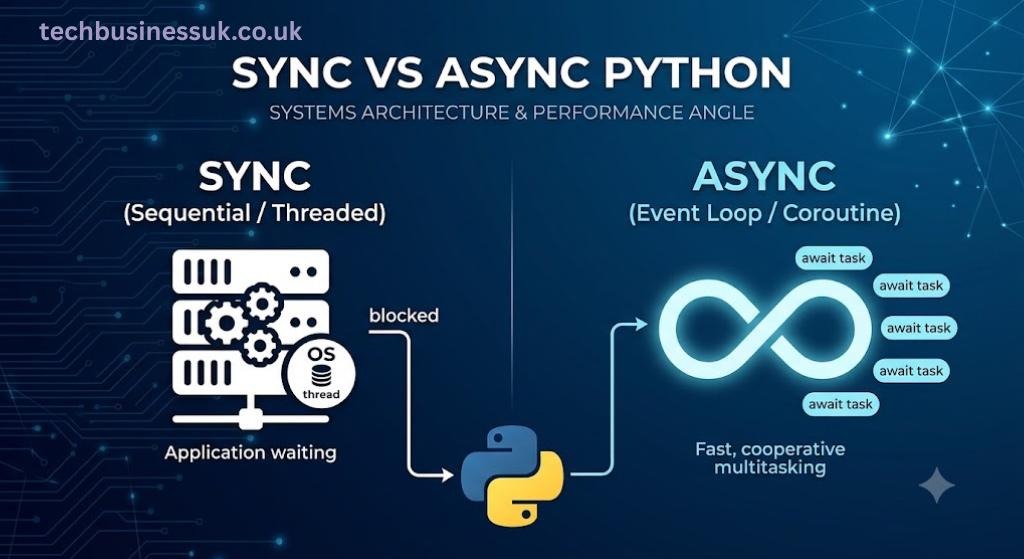
Every Python engineer eventually hits the same wall: a service that handles ten requests a second fine falls over at ten thousand. The instinct is to reach for more hardware. The actual problem is almost always a concurrency model mismatch, and that’s what the async vs sync debate really comes down to.
It isn’t a style preference, like tabs versus spaces. It’s a resource allocation problem. Get it wrong, and you’ll hit resource starvation long before you exhaust a single CPU core.
This article breaks down what’s actually happening underneath sync and async Python — at the thread level, the event loop level, and the memory level — so you can make the call deliberately, not by convention.
What “Async” Actually Means at the Runtime Level
Start with the definition, because most confusion in this space traces back to a fuzzy one. Async meaning, precisely: it’s cooperative multitasking. This design was formalized in Python Enhancement Proposal (PEP 492) to provide a clear, native syntax for defining coroutines, separating them conceptually from traditional generators. A coroutine runs until it voluntarily yields control, usually at an I/O boundary. Nothing forces it to give up the CPU — it chooses to, at well-defined points.
Start with the definition, because most confusion in this space traces back to a fuzzy one. Async meaning, precisely: it’s cooperative multitasking. **** A coroutine runs until it voluntarily yields control, usually at an I/O boundary. Nothing forces it to give up the CPU — it chooses to, at well-defined points.
Compare that to how the OS handles threads. Thread scheduling is preemptive. The kernel can interrupt a thread at almost any instruction boundary and hand the CPU to something else, whether the thread likes it or not. That single distinction — cooperative versus preemptive — is the root of almost every performance difference you’ll read about further down.
There are three concurrency primitives worth keeping straight:
- Coroutines — user-space, cooperatively scheduled, cheap to create, live inside a single OS thread.
- OS threads — kernel-scheduled, preemptive, each with its own stack, genuinely concurrent for I/O but constrained by the GIL for CPU-bound Python bytecode.
- OS processes — fully isolated, separate memory spaces, genuinely parallel, heaviest to create and communicate between.
Python didn’t start with clean syntax for any of this. Early async code was callback-based — deeply nested, hard to trace, harder to debug. Generators got repurposed as makeshift coroutines using yield from. It wasn’t until the language formalized dedicated async and await keywords that asynchronous code started reading like straight-line logic instead of a callback pyramid.
The Synchronous Execution Model: Thread Blocking Mechanics
Sync code is the default mental model for most engineers, so it’s easy to underestimate what it actually costs. Walk through the lifecycle of a single OS thread handling a request:
- Creation — the OS allocates a stack (commonly ~8 MB by default on Linux, though this is configurable) and registers the thread with the scheduler.
- Scheduling — the kernel decides when this thread actually gets CPU time, alongside every other runnable thread on the system.
- Context switch — when the thread blocks (say, waiting on a socket read), the CPU saves its register state and switches to another runnable thread. This isn’t free. It costs cache invalidation and a real, measurable number of CPU cycles.
- Teardown — stack memory gets reclaimed, the OS updates its scheduling tables.
Here’s the part that actually hurts in production: most of that thread’s life is spent blocked, not computing. A thread waiting on a database query or an HTTP call to a downstream service isn’t doing anything — it’s just occupying memory and a scheduling slot while the kernel waits for a completion signal.
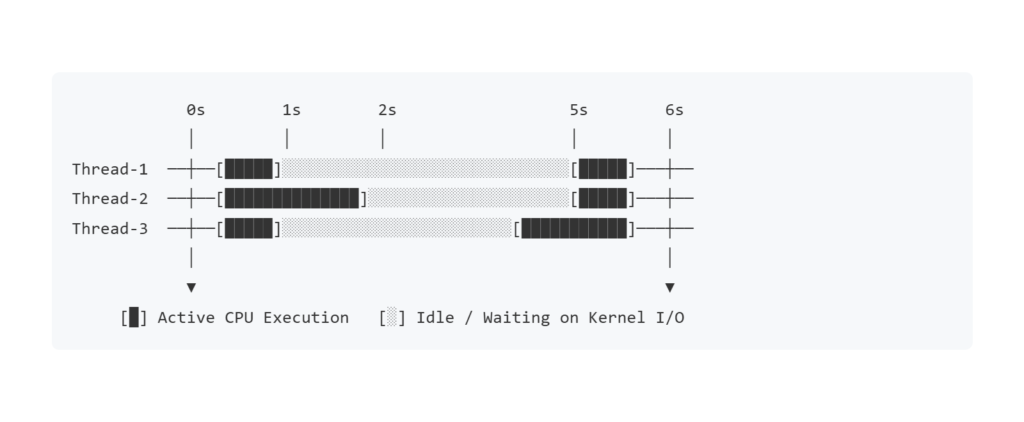
That diagram is the entire argument against synchronous thread-per-request models under I/O-heavy load. CPU-bound workloads don’t suffer from this nearly as much — a thread crunching numbers is actually using its slot. It’s I/O-bound workloads — network calls, disk reads, database round-trips — where sync threading burns resources doing nothing but waiting.
The Asynchronous Execution Model: Event Loop Internals
Now the other side. Understanding python async starts with understanding that there’s no magic concurrency happening — there’s one thread, running one thing at a time, just switching between tasks far more cheaply than the OS switches between threads.
At the center of it sits the event loop. Structurally, it’s a fairly simple machine:
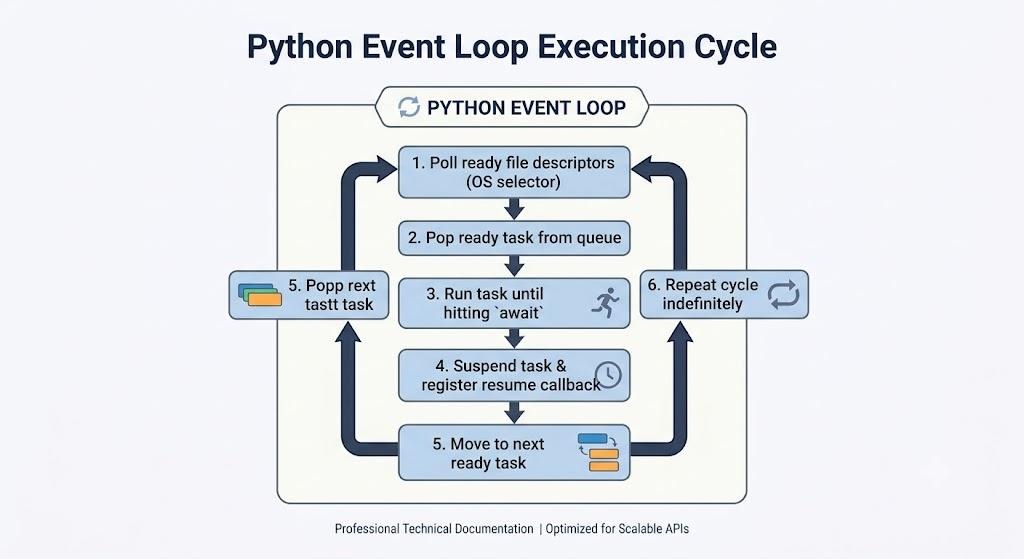
This is where async await earns its keep. When a coroutine hits await, it isn’t blocking the thread — it’s handing control back to the loop and saying, in effect, “wake me up when this I/O operation completes.” The loop is then free to run other ready tasks in the meantime. No new thread. No new stack. Just a suspended coroutine object sitting in memory until its result is ready.
Trace a single call end-to-end, and the mechanics of python async await become concrete:
- The event loop calls into a coroutine function, which returns a coroutine object (nothing has executed yet).
- The loop schedules that coroutine as a Task.
- The task runs synchronously until it hits an await on something I/O-bound — a socket read, a sleep, a DB driver call.
- Control returns to the loop. The task is now suspended; a Future representing the pending operation is registered with the loop’s selector.
- The loop polls the OS (via select/epoll/kqueue, depending on platform) for completed I/O.
- When the operation completes, the loop marks the Future done and reschedules the task to resume exactly where it left off.
The entire model rests on one hard rule: nothing here helps CPU-bound work. If a coroutine never hits an await — because it’s doing tight numeric computation instead of I/O — it blocks the entire event loop, not just itself. That’s the single most common way engineers accidentally sabotage an async system, and it’s worth internalizing before you write a line of async code.
Memory Overhead & Resource Starvation at Scale
This is where the architectural case for async becomes a spreadsheet problem, not a philosophical one.
| Concurrency Primitive | Typical Memory per Unit | Scheduling Overhead | Practical Max Concurrency (single machine) |
|---|---|---|---|
| OS Thread | ~8 MB stack (default, OS/config-dependent) | Kernel-level context switch | Low thousands before contention dominates |
| Coroutine (asyncio Task) | A few KB (frame + generator state) | In-process, scheduled by the event loop | Tens of thousands, sometimes far more, I/O-permitting |
| OS Process | Tens of MB (full interpreter + memory space) | Highest — separate memory space, IPC required | Bound tightly by core count, not connection count |
Run the math forward and the gap stops being theoretical:
| Concurrent Connections | OS Threads — Approx. Stack Memory | Coroutines — Approx. Memory |
|---|---|---|
| 10 | ~80 MB | Well under 1 MB |
| 1,000 | ~8 GB — often impractical | Tens of MB |
| 10,000 | Not realistic on most single machines | Hundreds of MB |
Resource starvation in a sync system rarely looks like “the CPU is maxed out.” It looks like the thread pool is exhausted, new connections are queued indefinitely, and latency climbs while CPU utilization sits comfortably under 30%. The bottleneck isn’t compute — it’s the fact that every blocked thread is still holding memory and a scheduling slot it isn’t using.
Context-switching cost compounds this. At 10 threads, switching overhead is noise. At 10,000 — which no sane system runs as OS threads, precisely because of this table — the kernel would spend a meaningful fraction of total CPU time just deciding what to run next, rather than running anything.
Async vs Sync: A Systems Trade-off Framework
None of this makes async strictly “better.” It makes it situationally better, and the situation is workload shape.
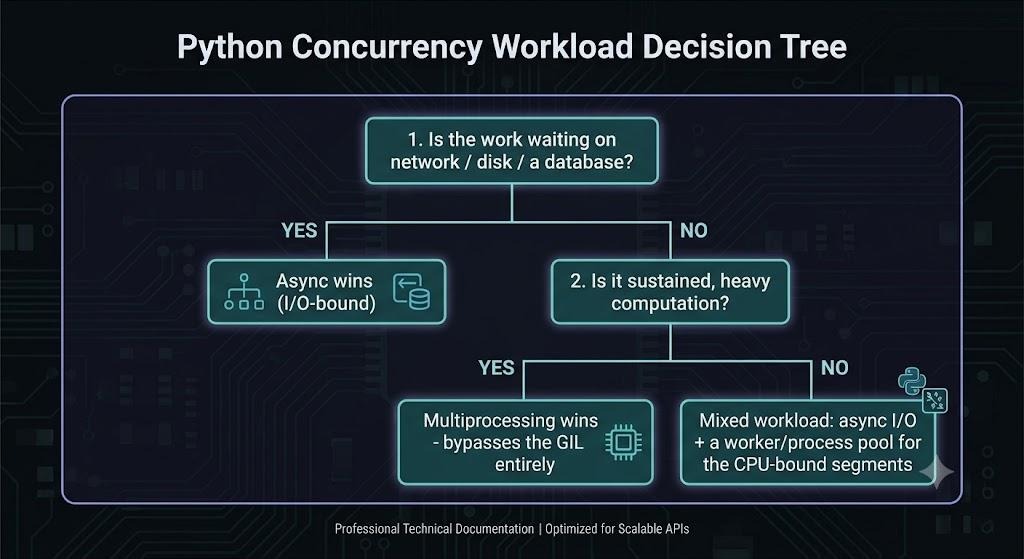
Put plainly, here’s where sync vs async actually lands once you strip out the hype:
- I/O-bound, high-concurrency workloads (API gateways, chat backends, scrapers, anything talking to a network far more than it computes) — async wins decisively. This is its home turf.
- CPU-bound workloads (image processing, heavy numeric computation, encryption at scale) — neither sync threading nor async coroutines help much, because the GIL limits genuine parallel execution of Python bytecode either way. Multiprocessing is the actual answer here.
- Low-concurrency, simple I/O (an internal script hitting one API sequentially) — sync is often correct, not just acceptable. Async adds complexity that buys you nothing if you’re never running more than a handful of things concurrently.
- Mixed workloads — the honest answer for most real backend systems — need a hybrid: an async event loop handling I/O, offloading CPU-heavy segments to a process pool so they don’t stall the loop.
The async vs sync decision, in other words, isn’t about which model is more modern. It’s about whether your bottleneck is waiting or computing — and those two problems have entirely different solutions.
From Concurrency Model to Connection Model: Why This Matters for Persistent Systems
Everything above assumes a request comes in, gets handled, and the connection closes. That’s true for a typical API call. It stops being true the moment you’re holding a connection open — a WebSocket, a long-poll, a streaming pipeline — for minutes or hours instead of milliseconds.
The event loop mechanics don’t change. What changes is the arithmetic. A system handling 10,000 short-lived requests per second and a system holding 10,000 concurrent WebSocket connections open all day are doing very different things with memory and scheduling, even though both are “async.” The former is a throughput problem. The latter is a long-running state management problem layered on top of everything covered here — every open connection is a suspended coroutine sitting in memory for the life of that session, not the life of a single request.
For a deep-dive on how these event-loop mechanics apply to long-lived, stateful connections, see our guide to building a resilient WebSocket manager.
The same principles that make async efficient for a REST-style async api — cheap per-unit memory, no thread-per-connection tax, cooperative scheduling instead of kernel context switches — are the exact reasons it’s the only realistic foundation for systems that need to hold thousands of connections open simultaneously without falling over.
Conclusion — Choosing Your Concurrency Model Deliberately
The async vs sync question isn’t settled by trend-following. It’s settled by knowing whether your system spends its time waiting on I/O or burning CPU cycles — and then matching the concurrency primitive to that reality instead of the other way around.
Sync threading isn’t wrong. It’s wrong for high-concurrency I/O-bound workloads, where blocked threads sit on memory and scheduling slots they aren’t using. Async isn’t a universal upgrade either — it’s a specific answer to a specific bottleneck, and it does nothing for CPU-bound code that never yields.
Get the workload diagnosis right, and the async vs sync decision mostly makes itself.
FAQs
Does async always use less memory than sync?
For I/O-bound workloads at meaningful concurrency, yes, by a wide margin — see the tables above. At low concurrency (a handful of connections), the difference is negligible, and the added complexity of async may not be worth it.
Why is debugging async code harder than sync code?
Stack traces in async code often show where a coroutine resumed, not the full causal chain of how it got there across suspensions. Tools like asyncio’s debug mode and structured logging around task creation help, but the mental model takes deliberate practice to build.
Does async make CPU-bound code faster?
No — and this is the most common misconception. Async solves waiting, not computing. A CPU-bound coroutine that never awaits will block the entire event loop, not speed anything up.
I’m still building the fundamentals — where should I start?
If you haven’t yet written your own coroutines, a hands-on python async tutorial for beginners covering basic syntax and simple examples will make everything in this article click faster before you apply it at the architecture level described here.
About the Author