Introduction
For years, we built real‑time features the hard way—short polling, long polling, Server‑Sent Events with their one‑way limitations. Then WebSockets arrived, and everything changed. Suddenly, full‑duplex, low‑latency communication became a browser standard. But adopting WebSockets is one thing; building a production‑grade system that survives connection storms, network flakiness, and multi‑instance deployments is another.
This is where FastAPI shines. Remember our fastapi vs flask deep dive? Flask’s WSGI model is synchronous to its core—it processes one request per worker, blocks, and exits. You cannot hold a WebSocket on WSGI without spinning external workers (like uWSGI’s websocket mode or using gevent), and even then it feels like a hack. FastAPI, however, sits on Starlette’s ASGI foundation. The event loop juggles thousands of concurrent sockets with zero drama. That architectural advantage isn’t theoretical—it’s the difference between a prototype that crashes at 100 users and a system that handles 10,000 without breaking a sweat.
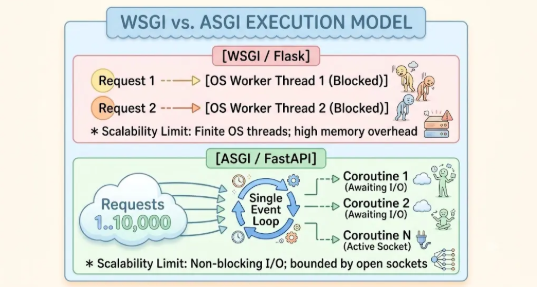
But let’s talk about real costs. Keeping a TCP socket open isn’t free. Each connection consumes a file descriptor, memory for the receive/send buffers, and a slice of the event loop’s attention. REST APIs scale horizontally by throwing more workers at stateless requests. WebSockets are stateful by nature—they require a dedicated, long‑lived context. If you don’t architect that context correctly, you’ll hit Linux’s file descriptor limit (ulimit -n) far sooner than you’ll hit your CPU ceiling.
In this guide, we’ll dissect the lifecycle of a fastapi websocket, build a connection manager that doesn’t leak memory, secure endpoints against hijacking, scale horizontally with Redis, and test everything like professionals. No fluff. Just code‑adjacent architecture and battle‑tested patterns.
Understanding the FastAPI WebSocket Lifecycle
Every WebSocket begins as an HTTP request—but that request carries an Upgrade: websocket header. The server responds with 101 Switching Protocols, and the TCP connection upgrades. That handshake happens once. After that, the socket stays open until one side decides otherwise.
FastAPI exposes this through the @app.websocket() decorator (for specific syntax and configuration options, see the FastAPI Official WebSocket Documentation). Inside, you have a WebSocket object with four essential async methods: accept(), receive_text(), send_json(), and close(). But here’s the catch—you must handle
WebSocketDisconnect. This exception fires when the client drops the connection (closing the browser, losing network, or explicitly calling close()). If you don’t catch it, your handler crashes, and you leak resources. Always, always wrap your receive loop in try/except WebSocketDisconnect.
The ASGI Scope: Your Hidden Context
Beneath the surface, every WebSocket instance carries an ASGI scope dictionary. This is your backstage pass. It contains the path, query parameters, headers (yes, the ones you can’t access via the browser API), and the underlying asyncio transport. You can inspect websocket.scope to pull out the client IP, user_agent, and even the raw headers list. This is invaluable for logging and geo‑routing without forcing the client to resend metadata.
The state machine is simple: CONNECTING → ACCEPTED → CONNECTED → DISCONNECTED. But the real work happens in those while True loops. That’s where you process incoming messages, run business logic, and send responses.
Performance Nuances of Receive Methods
FastAPI gives you receive_text(), receive_bytes(), and receive_json(). Choose wisely. receive_json() deserializes the payload using json.loads() under the hood. If you’re handling high‑throughput telemetry data (thousands of messages per second), this deserialization overhead stacks up. Profile it. Sometimes raw text with a lightweight serializer like orjson (dropped in via custom hooks) beats the built‑in convenience. For 95% of use cases, though, receive_json() is perfectly fine—just be aware of the hidden CPU tax.
A minimal endpoint looks like this—no more than a dozen lines:
@app.websocket(“/ws”)
async def ws_endpoint(websocket: WebSocket):
await websocket.accept()
try:
while True:
data = await websocket.receive_text()
await websocket.send_text(f”Echo: {data}”)
except WebSocketDisconnect:
print(“Client gone. Clean up.”)
Short. Deadly. Production‑ready? Not yet. Because you need a connection manager to track who’s online.
Building a Production Connection Manager
A ConnectionManager isn’t optional—it’s the brain of your real‑time system. It holds references to all active WebSocket connections, maps them to user IDs or rooms, and broadcasts messages efficiently.
Ghost Connections and the Send Failure
Here’s a hard‑earned lesson: a client can disappear without firing a WebSocketDisconnect. Mobile apps switching networks, laptops going to sleep—the TCP stack doesn’t immediately inform your server. Your manager still holds onto that WebSocket object. Later, when you try to send_json() to that ghost client, you get a RuntimeError or ConnectionClosedError. If your broadcast loop isn’t resilient, that single dead client blocks the entire room. Solution: Wrap every send_* call in a try/except and immediately remove the client on failure. Don’t wait for the main loop to catch it.
The core requirement: thread‑safety. FastAPI’s event loop is single‑threaded per worker, but when you have multiple async tasks (e.g., a heartbeat task and a message receiver), you still risk race conditions when adding/removing connections. Use asyncio.Lock to guard shared dictionaries.
Memory Management Strategies
Most managers use plain dict or set to store references. This keeps connections alive forever—exactly what you want while they’re active. But if your disconnect logic has a bug, you’ll leak memory. Some engineers reach for weakref.WeakValueDictionary to auto‑cleanup on garbage collection. I advise against it. Weakrefs mask underlying bugs. You want your integration tests to fail if you forget to call disconnect(). Explicit cleanup is safer and easier to debug.
Your manager should offer:
- connect(client_id, websocket) – accepts the socket and registers it.
- disconnect(client_id) – removes the client from all rooms.
- send_to_client(client_id, message) – targeted delivery.
- broadcast(message, room=None) – sends to everyone or a specific room.
Here’s the critical insight: disconnect must be called even when the client aborts abruptly. If you only clean up on graceful closes, your active_connections dict grows indefinitely, and you eventually hit memory limits. The WebSocketDisconnect exception is your trigger—catch it, call manager.disconnect(client_id), and log it.
Room‑based broadcasting is another must‑have. Not every message goes to everyone. You’ll likely have chat rooms, project‑specific updates, or user‑specific notifications. The manager should maintain a room -> set(client_ids) mapping and broadcast only to the relevant set.
Graceful Shutdown on Server Restart
When you deploy new code, Uvicorn sends a SIGTERM. If you don’t handle it, the event loop cancels all running tasks mid‑broadcast—leaving clients hanging with pending sends. Use @app.on_event(“shutdown”) to iterate over your manager’s connections and call websocket.close(code=1001, reason=”Server going away”). Give that process a timeout (e.g., 10 seconds) before forcing the loop to close. It’s a small courtesy that prevents client‑side reconnection storms.
Securing WebSocket Endpoints
Now the tricky part—WebSocket security is different from REST.
Browser’s native WebSocket API doesn’t let you set custom headers like Authorization. You can’t just slap a JWT in the headers and call it a day. So how do you authenticate?
Strategy 1: JWT in Query Parameters (Most Common)
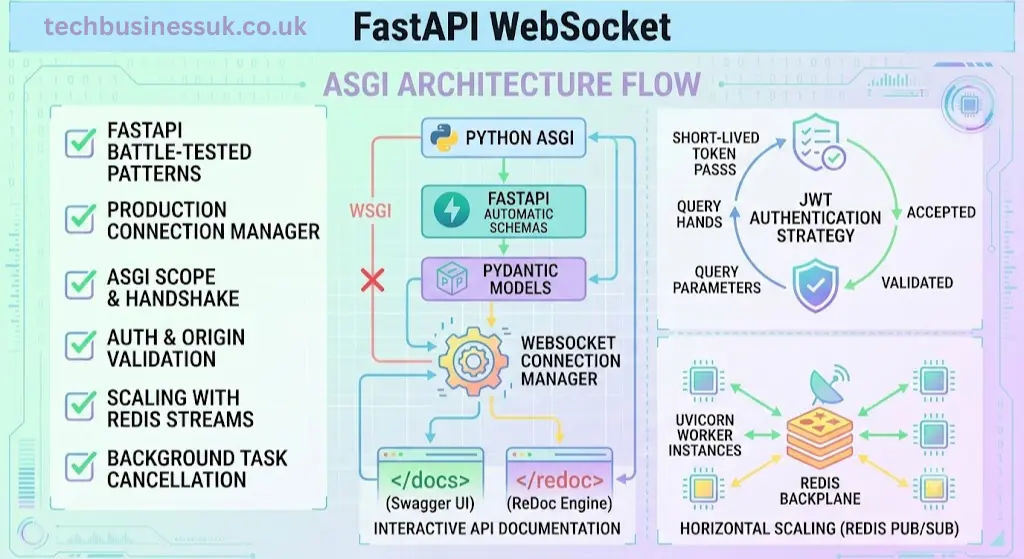
The client connects with ws://your-api/ws?token=eyJhbGci…. FastAPI extracts it via Query(…). You validate the token before calling accept(). If invalid, close the socket immediately with a policy violation code (1008). This approach works everywhere—browsers, mobile apps, IoT devices. The downside: query strings end up in server logs and browser history. Mitigate by using short‑lived tokens (5‑15 minutes) and refreshing them via a separate HTTP endpoint.
Strategy 2: First‑message Handshake
Accept the connection, then require the first incoming message to contain credentials. This is more flexible but adds latency—the client must authenticate before sending real data. It also complicates reconnection logic.
The Origin Header is Your First Wall
Cross‑Site WebSocket Hijacking (CSWSH) is real. A malicious site can open a WebSocket connection to your endpoint using an authenticated user’s cookies if you rely only on session cookies (which, by the way, are hard to use with raw WebSockets). The Origin header tells you where the request came from. Validate it against a whitelist. FastAPI lets you access this via websocket.headers.get(“origin”). Reject non‑whitelisted origins immediately before even attempting JWT validation. This is your first line of defense.
Whichever you pick, integrate it with your existing authentication system. As we covered in our api security tools article, WebSocket endpoints are prime targets for socket hijacking and DoS attacks. Implement per‑connection rate limiting—track message frequency per client_id and drop connections that exceed a threshold (e.g., 60 messages per minute). Also, validate the origin header to prevent cross‑site WebSocket hijacking.
And please—never trust the client. Treat every incoming message as untrusted. Validate payload schemas with Pydantic (via receive_json() and model parsing), sanitize input, and apply the same authorization rules you’d enforce on REST endpoints.
Horizontal Scaling & Multi‑Worker Deployments
Here’s where most tutorials go quiet. They show you a beautiful manager that works perfectly on a single Uvicorn worker. Then you scale to –workers 4 and everything breaks.
Why? Because each worker has its own memory space. Worker 1 holds Client A’s connection; Worker 3 holds Client B’s. When Client A sends a broadcast, Worker 1’s manager doesn’t even know Client B exists. The broadcast goes nowhere.
Sticky Sessions are a Trap
Some cloud load balancers offer “sticky sessions” (source IP affinity). They route all requests from a single client to the same worker. This seems like an easy fix—your in‑memory manager suddenly works across multiple clients if they’re on different IPs. But what if Client A and B share the same office IP? Or what happens when a worker dies and restarts? All its connections are lost, and sticky sessions don’t transfer them. Sticky sessions are a band‑aid, not a solution.
The true solution is externalizing connection state—and Redis Pub/Sub is the gold standard.
Every worker publishes messages to a Redis channel. All workers subscribe to that channel. When a worker receives a message from Redis, it looks up the target client in its local connection dictionary and forwards it. This way, the state is distributed, but the actual delivery is local and fast.
Redis Backpressure and Message Loss
Redis Pub/Sub is fire‑and‑forget. If a worker is momentarily overwhelmed (GC pause, network spike) and falls behind on reading the Redis socket, messages get dropped. For chat applications, dropping a message is annoying. For financial or IoT control planes, it’s catastrophic. Consider using Redis Streams instead of Pub/Sub. Streams support consumer groups with explicit acknowledgments—you don’t delete a message from the stream until the worker confirms delivery to the client. The trade‑off is higher latency and memory usage on the Redis side. Evaluate accordingly.
You also need a heartbeat ping/pong mechanism. A client might lose network connectivity without triggering an immediate disconnect. If you don’t detect this, the connection remains in your manager forever. Send a ping every 30 seconds; if the pong doesn’t come back, drop the socket.
In practice, you’ll have a background asyncio task per connection that sends those pings. And when the connection finally dies, you cancel that background task—otherwise you’ll have zombie tasks piling up.
Background Tasks and Cancellation Scopes
Here’s where fastapi websocket background tasks become a critical concept. You often spawn a background coroutine to write logs, update a database, or call external APIs based on the received messages. Fire‑and‑forget is dangerous. If the client disconnects while that background task is halfway through a database transaction, you’ll leave dangling transactions or unclosed connections. Use asyncio.TaskGroup (Python 3.11+) or asyncio.gather with explicit cancellation handlers. When you catch WebSocketDisconnect, you must call .cancel() on all background tasks and await them to ensure they finish cleaning up. Otherwise, the event loop holds onto them until the server restarts.
Scaling fastapi websocket horizontally means embracing Redis, designing for stateless authentication (JWT), and using Uvicorn with –reuse-port for true load balancing across workers.
Testing & Validating FastAPI WebSockets
Testing WebSockets isn’t like testing REST. You can’t just send one request and assert the response. You need to simulate persistent connections, multiple clients, and disconnections.
FastAPI’s TestClient has built‑in support via with client.websocket_connect(“/ws”) as websocket:. You can send and receive messages inside that context. But that only tests a single client. For broadcast scenarios, you’ll need multiple simultaneous clients.
I recommend pytest-asyncio and the websockets library. Spin up your FastAPI app in a background thread (or use httpx.AsyncClient for the test server), then open two WebSocket connections in the same test. Send a message from client A and verify that client B receives it.
The Reconnect Nightmare
Don’t forget to test reconnection logic. When your server restarts or the network blips, the client must reconnect. Write an integration test that abruptly kills the server (via a mock signal) and ensures the client’s exponential backoff doesn’t turn into a DDoS attack on your own infrastructure. Validate that the disconnect handler clears the connection manager’s state within a reasonable timeout (say, 5 seconds).
Also test failure modes: what happens when a client disconnects mid‑broadcast? Does the manager clean up correctly? Does a background heartbeat task get cancelled? These are the bugs that surface only in production, so catch them in your test suite.
Our api testing tools guide dives deeper into automated testing strategies—including mocking Redis, simulating network timeouts, and measuring latency. The key takeaway: stateful testing requires stateful assertions. Don’t rely on mocks alone; run real integration tests with a test Redis instance.
Conclusion & Architectural Summary
Let’s recap with a production‑ready checklist for your next fastapi websocket implementation:
- Lifecycle: Accept the connection, then loop with try/except WebSocketDisconnect. Never skip this—it prevents handler crashes and silent memory leaks.
- Scope: Inspect websocket.scope for headers, client IPs, and the Origin header. Eliminates the need for clients to resend metadata.
- Manager: Keep it thread‑safe, room‑aware, and brutally aggressive about cleaning up ghost connections. A single dead socket must never block a broadcast.
- Authentication: Use short‑lived JWTs in query parameters. Validate the Origin header religiously to block Cross‑Site WebSocket Hijacking.
- Background Tasks: Always .cancel() every spawned task on disconnect. Use TaskGroup (Python 3.11+) to manage lifetimes—zombie tasks corrupt state.
- Scaling: Externalize connection state with Redis. For critical data, prefer Redis Streams over Pub/Sub to avoid message loss under backpressure. Send heartbeat pings every 30 seconds.
- Testing: Build multi‑client integration tests that simulate forced disconnections and reconnections. This is the only way to catch cleanup race conditions before production does.
Quick Comparison Table
| Area | Action | Why / Critical Caveat |
|---|---|---|
| Lifecycle | Wrap every receive_* loop in try/except WebSocketDisconnect. | Prevents crashes and ensures disconnect() is always called. |
| Scope | Read websocket.scope for client IP, headers, and origin. | Saves the client from resending metadata; essential for origin validation. |
| Manager | Make it thread‑safe, room‑mapped, and purge send‑failures immediately. | Stops a single dead client from stalling the entire room broadcast. |
| Authentication | Pass short‑lived JWTs via query params; whitelist the Origin header. | Query tokens avoid header limitations; origin whitelisting blocks CSWSH. |
| Background Tasks | Cancel all background tasks on disconnect; use asyncio.TaskGroup if available. | Prevents dangling transactions, unclosed DB connections, and event‑loop clogging. |
| Scaling | Use Redis (Streams > Pub/Sub for critical data) and heartbeat pings. | Pub/Sub drops messages under backpressure; pings detect silent network drops. |
| Testing | Write integration tests with multiple concurrent clients and forced server kills. | The only reliable way to validate reconnect logic and cleanup routines. |
FastAPI’s ASGI foundation makes WebSocket handling efficient, but it doesn’t solve the distributed state problem for you. That’s your job. By following these patterns, you avoid the common pitfalls—memory leaks, stale connections, authentication bypasses, and broadcast failures.
For the broader context, revisit our fastapi vs flask piece to understand why you shouldn’t even try WebSockets on WSGI. For security hardening, our api security tools guide covers token validation and rate limiting in depth. And for automated validation, the api testing tools article shows you how to build a robust test harness.
.
Now go build something that handles a million concurrent sockets.
Also Read: FastAPI vs Flask: The 2026 Production Migration Blueprint
FAQs
1. Why can’t I just use HTTP Authorization headers for FastAPI WebSocket authentication?
Because the browser’s native WebSocket API flat‑out refuses to send them.
That’s the brutal truth. When you call new WebSocket(“ws://api/ws”), you have zero control over the request headers. No Authorization: Bearer. No custom X-API-Key. The spec simply doesn’t allow it. So your beautifully crafted OAuth2 middleware? Useless here.
So what do you do?
You adapt. The industry standard is passing a short‑lived JWT as a query parameter: ws://api/ws?token=eyJ…. FastAPI plucks it out with Query(…) before you even call accept(). If the token stinks—close the socket with a 1008 policy violation and walk away.
But hold on—query strings get logged. Yes, they do. Your NGINX logs, your CloudWatch streams, your developer consoles—they’ll all scream that token in plain sight. Mitigation: Keep those tokens painfully short‑lived (5‑15 minutes) and rotate them religiously via a separate REST endpoint. And for heaven’s sake, validate the Origin header while you’re at it. If that origin isn’t on your whitelist, abort the handshake immediately. That’s your first wall against Cross‑Site WebSocket Hijacking.
2. My WebSocket works locally but explodes in production with multiple workers—what gives?
You forgot that memory isn’t shared. Uvicorn workers are isolated processes.
Your beautiful in‑memory ConnectionManager that tracks all clients? Worker 1 has its own list. Worker 2 has a completely different list. When Worker 1 tries to broadcast to “everyone”, it only sees its clients. Client B, sitting pretty on Worker 3, hears absolutely nothing. The broadcast fails silently—and your users just see a dead chat.
Stop. Using. Sticky. Sessions.
Yes, load balancers can pin a client to a single worker based on IP. It feels like a quick fix. But what happens when Worker 1 restarts during a deployment? All its clients get dropped, and sticky sessions can’t magically transfer those open sockets to Worker 2. It’s a band‑aid that rips off at the worst moment.
The real solution? Externalize your state.
Redis Pub/Sub is the battle‑tested standard. Every worker publishes outgoing messages to a Redis channel, and every worker subscribes to that same channel. When a message arrives via Redis, the worker checks its own local connection dictionary and forwards it. Simple, stateless, and horizontally scalable.
Critical nuance: Are you using Redis Pub/Sub for financial data or control commands? Then switch to Redis Streams. Pub/Sub is fire‑and‑forget. If a worker is momentarily slammed and misses a message—poof, it’s gone forever. Streams give you consumer groups and explicit acknowledgments. Your system might be 10% slower, but it won’t lose a single order.
3. I caught WebSocketDisconnect, but my connections still leak. Why?
Because a client can go silent without triggering an exception—and your background tasks are running wild.
Let’s break the illusion. You wrapped your while True: await websocket.receive_text() in a perfect try/except. The client closes their laptop. The TCP connection doesn’t instantly break—it lingers in a half‑open state. Your server thinks the client is still there. No exception fires. That client stays forever in your ConnectionManager. Congrats, you have a memory leak dressed in a ghost connection.
The first fix: Heartbeat pings.
Send a ping every 30 seconds. If the pong doesn’t come back within a reasonable timeout, you force a websocket.close() and call manager.disconnect(). No exceptions needed—you proactively evict the zombie.
The second fix: Stop forgetting your background tasks.
You spawned a background task to stream logs to S3, right? Or a heartbeat task for that client? When the client disconnects gracefully, your main loop catches WebSocketDisconnect and breaks. But that background task? It’s still running. It holds a reference to the websocket object. It keeps the connection alive in the event loop’s context. The garbage collector can’t touch it. You now have a zombie task spinning forever, eating CPU and holding onto dead sockets.
Here’s your mantra: When you catch WebSocketDisconnect, immediately call .cancel() on every background task you spawned for that client and await them to ensure they finish cleaning up. Use asyncio.TaskGroup (Python 3.11+) to manage child tasks—it automatically cancels them when the parent exits. No exceptions. No excuses. If you don’t actively kill them, they will kill your server’s throughput.
About the Author