
A financial trading firm releases an endpoint for portfolio updates. One algorithmic trading client spins up a multi-threaded poll loop without exponential backoff. Within four minutes, microservice queues back up, internal connection pools starve, and thousands of legitimate traders get locked out of their accounts.
Building reliable applications requires evaluating api rate limiting not as an afterthought, but as a critical non-functional requirement. Without enforced consumption boundaries, your services remain wide open to noisy neighbors, unexpected traffic surges, and malicious exploitation.
This guide breaks down everything you need to know about api rate limiting: core mechanisms, the top 5 rate limiting algorithms, distributed implementation using distributed rate limiting redis patterns, gateway integration, security considerations, and production best practices.
What Is API Rate Limiting?
So, what is rate limiting?
At its core, api rate limiting is a defensive control designed to restrict the number of API requests a consumer can submit within a defined timeframe.
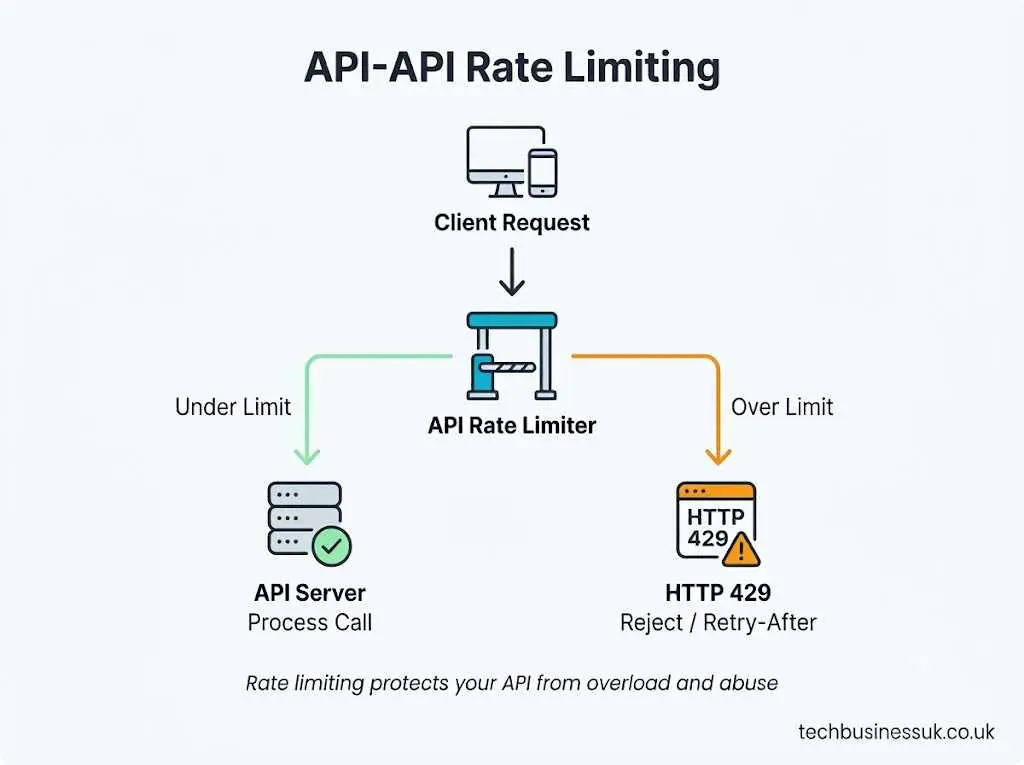
Think of rate limiting in api design like a bouncer at an exclusive venue. The bouncer doesn’t inspect your entire background—they ensure the venue does not exceed safe operating capacity and that individuals enter at an orderly pace.
A standard api rate limiting policy might state: “An authenticated tenant may execute up to 100 requests per minute per API key.”
Enforcing rate limiting serves three distinct engineering goals:
- Preventing Service Overload: Keeps sudden traffic spikes from consuming all available backend threads, CPU cycles, or memory.
- Ensuring Fair Usage: Prevents a single high-volume client (“noisy neighbor”) from starving resources reserved for other tenants.
- Controlling Operational Costs: Prevents runaway bills when APIs invoke third-party services, LLMs, or pay-per-execution serverless functions.
Rate Limiting vs Throttling vs Quotas
Engineering teams frequently mix up these terms. However, analyzing throttling vs rate limiting reveals clear structural differences across execution boundaries.
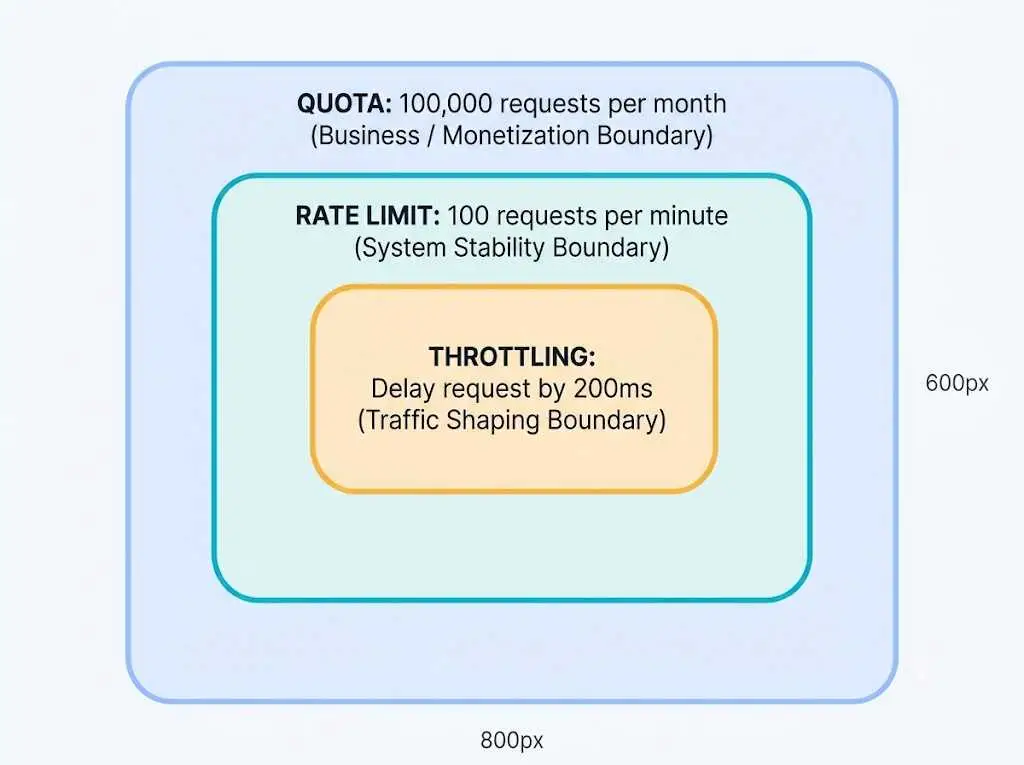
1. Rate Limiting
A hard cap applied over short time windows (e.g., seconds or minutes). Once a client breaches the threshold, the system immediately rejects incoming requests with an explicit error code.
2. Throttling
A dynamic traffic-shaping control. Instead of outright rejecting a request, the system deliberately delays (slows down) processing—often queuing the request or injecting artificial latency—to smooth out incoming bursts.
3. Quotas
High-level consumption caps measured over extended business periods (e.g., daily, monthly, or billing cycles). Quotas are tied directly to billing tiers rather than immediate server stability.
| Concept | Definition | Primary Purpose | Typical Time Window | Enforcement Action |
|---|---|---|---|---|
| Rate Limiting | Strict caps on incoming call volumes | Infrastructure protection & failure isolation | Milliseconds, seconds, minutes | Hard rejection (HTTP 429 Too Many Requests) |
| Throttling | Dynamic slowing or queuing of requests | Smoothing out momentary traffic spikes | Sub-second, real-time bursts | Added latency, internal queuing, or delayed response |
| Quotas | Total aggregate allowance assigned to a tenant | Tiered monetization & business usage tracking | Days, billing months, fiscal quarters | API access suspension or overage billing alerts |
Consider a free-tier user on an enterprise analytics platform. The account carries a monthly quota of 50,000 calls. To prevent that user from exhausting their quota in a five-minute burst and overwhelming downstream databases, an api rate limiting policy imposes a sub-limit of 10 requests per second. If they hit 15 requests in a single second, temporary throttling slows the excess requests down, or a rate-limit error drops them immediately.
What Does “503 Rate Limiting” Mean?
A common point of confusion among engineers revolves around the phrase 503 rate limiting meaning.
Here is the short answer: 503 is the wrong status code for rate limiting.
When a client hits an api rate limiting cap, the standard protocol response is HTTP status 429 (Too Many Requests).
HTTP
HTTP/1.1 429 Too Many Requests
Content-Type: application/json
Retry-After: 30
X-RateLimit-Limit: 100
X-RateLimit-Remaining: 0
X-RateLimit-Reset: 1717180860

{
  "error": "rate_limit_exceeded",
  "message": "API rate limit of 100 requests per minute exceeded. Retry in 30 seconds."
}
Why You See 503 Errors Instead of 429
If an API returns HTTP 503 (Service Unavailable) during high traffic, your rate limiter didn’t reject the call—your backend crashed or ran out of resources.
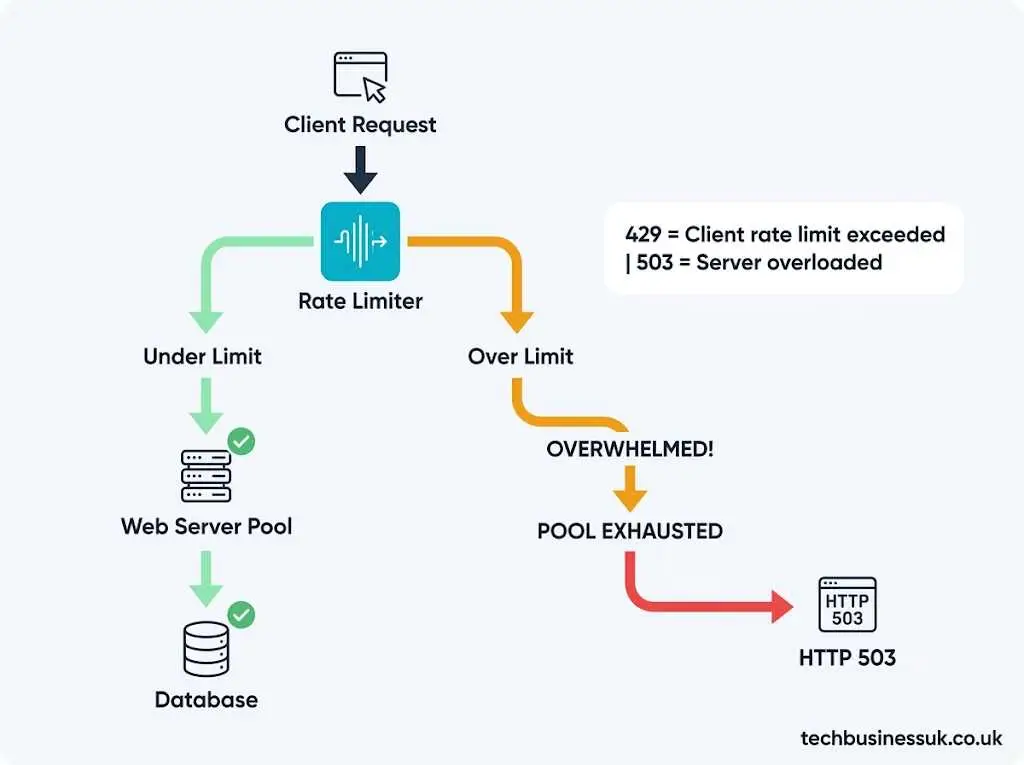
A 503 status means downstream web servers, internal API gateways, or database connection pools were completely overwhelmed and could not fulfill the request. The infrastructure failed before or without a functional api rate limiting check.
| Status Code | Standard Definition | Cause | Action Required by Client |
|---|---|---|---|
429 Too Many Requests |
Client rate limit exceeded | Active rate limiter block | Pause requests; respect Retry-After header |
503 Service Unavailable |
Server overloaded or down | Infrastructure capacity failure | Exponential backoff; contact platform admin |
If your system emits 503s under load, your rate limits are set too high, your rate-limiting check is sitting behind a bottleneck, or you lack an active rate-limiting layer altogether.
The 5 Major Rate Limiting Algorithms
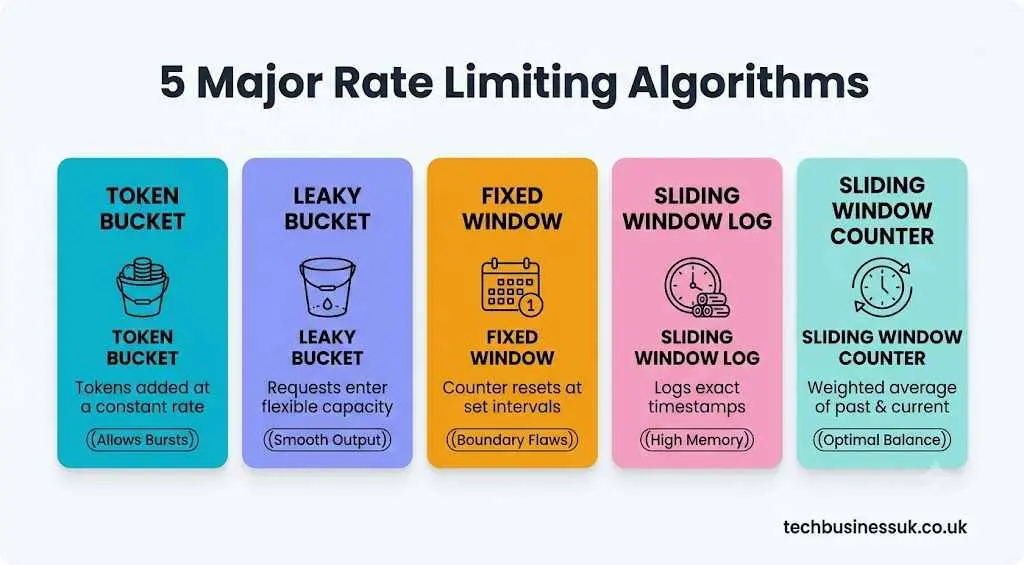
Selecting the right rate limiting algorithms dictates how your system handles bursty traffic, memory utilization, and execution latency.
1. Token Bucket
Tokens are added to a “bucket” at a constant rate up to a predefined maximum capacity. Each incoming API call must consume one token to proceed. If the bucket is empty, the request is dropped.
Python
import time

class TokenBucket:
    def __init__(self, capacity: int, refill_rate: float):
        self.capacity = capacity        # Maximum tokens bucket can hold
        self.refill_rate = refill_rate  # Tokens added per second
        self.tokens = capacity
        self.last_refill = time.time()

    def allow_request(self) -> bool:
        now = time.time()
        elapsed = now - self.last_refill

        # Add accumulated tokens based on time elapsed
        self.tokens = min(self.capacity, self.tokens + elapsed * self.refill_rate)
        self.last_refill = now

        if self.tokens >= 1:
            self.tokens -= 1
            return True
        return False
Best Use Case: APIs that need to support short, legitimate user bursts without dropping requests.
Trade-Offs: Requires tracking two variables per tenant (last refill timestamp and token count).
2. Leaky Bucket
Incoming requests enter a FIFO (First-In, First-Out) queue. The queue processes requests at a strictly constant output rate regardless of incoming volume. If the queue overflows, new requests drop instantly.
Best Use Case: Systems processing asynchronous background jobs or calls sending data to rate-sensitive downstream legacy dependencies.
Trade-Offs: Introduces processing latency for queued items; bursts are smoothed out rather than allowed.
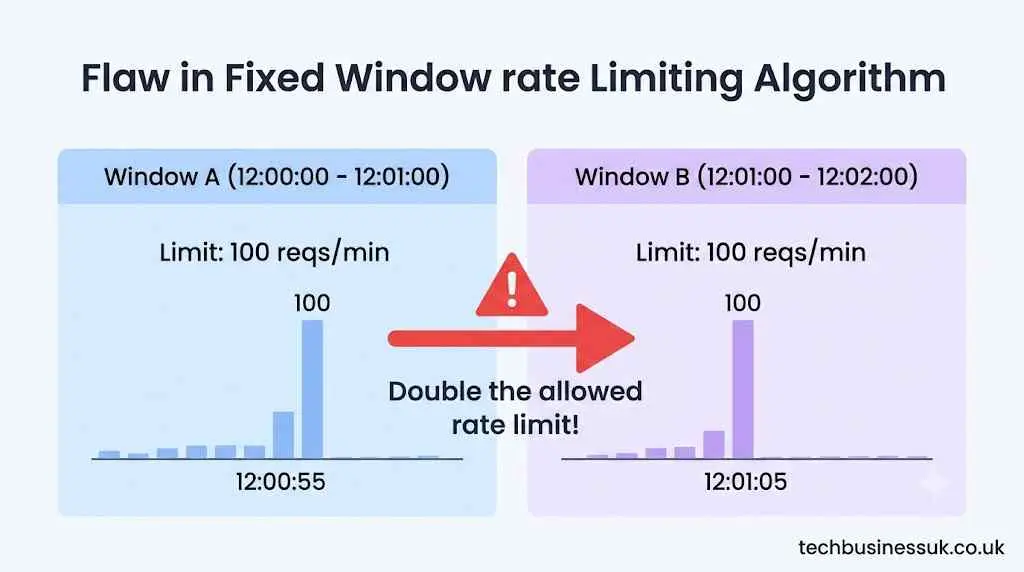
3. Fixed Window Counter
Time is divided into fixed intervals (e.g., 60-second blocks). A counter tracks incoming requests per window. When the window expires, the counter resets to zero.
Best Use Case: Lightweight internal microservices prioritizing raw execution speed and minimal memory footprints.
Trade-Offs: Boundary Burst Problem. A client sending its maximum limit in the last 5 seconds of Window A and another burst in the first 5 seconds of Window B can double its allowed rate across that narrow boundary.
4. Sliding Window Log
Tracks a granular timestamped log of every request made by a client. When a new request arrives, the algorithm purges logs older than the window length and counts the remaining logs to evaluate compliance.
- Best Use Case: High-security financial transactions or critical API actions requiring 100% boundary accuracy.
- Trade-Offs: Extremely high memory consumption. Every request writes a log entry, creating scale bottlenecks under high volumes.
5. Sliding Window Counter
A hybrid approach combining Fixed Window speed with Sliding Log accuracy. It calculates a weighted average of the current window request count and the previous window request count based on the current time position.
Formula:
Current Weight = (Window Size - Elapsed Time in Current Window) / Window Size
Estimated Reqs = (Previous Window Count * Current Weight) + Current Window Count
- Best Use Case: Scalable, modern production APIs requiring accuracy without maintaining memory-heavy logs.
- Trade-Offs: Minor estimation variance (assumes past window traffic was evenly distributed), but accuracy remains above 99% in practice.
How to Choose the Right Rate Limiting Algorithm
Use this decision matrix to evaluate rate limiting algorithms based on your operational constraints:
| Algorithm | Traffic Pattern | Accuracy | Memory Overhead | Complexity | Recommended For |
|---|---|---|---|---|---|
| Token Bucket | Burst-friendly | High | Very Low (O(1) space) |
Low | General-purpose web APIs |
| Leaky Bucket | Smooth output | High | Low (O(N) queue depth) |
Medium | Asynchronous queue processing |
| Fixed Window | Bursty at boundaries | Low | Lowest (O(1) space) |
Very Low | Simple internal endpoints |
| Sliding Log | Strictly enforced caps | Perfect | High (O(N) requests) |
High | Low-volume, high-value endpoints |
| Sliding Counter | Controlled bursts | Very High (~99%+) | Very Low (O(1) space) |
Medium | High-volume public platforms |
Recommendation: Default to Sliding Window Counter or Token Bucket for most enterprise APIs. They deliver robust boundary enforcement without consuming excessive cache memory.
Implementing Rate Limiting at the API Gateway
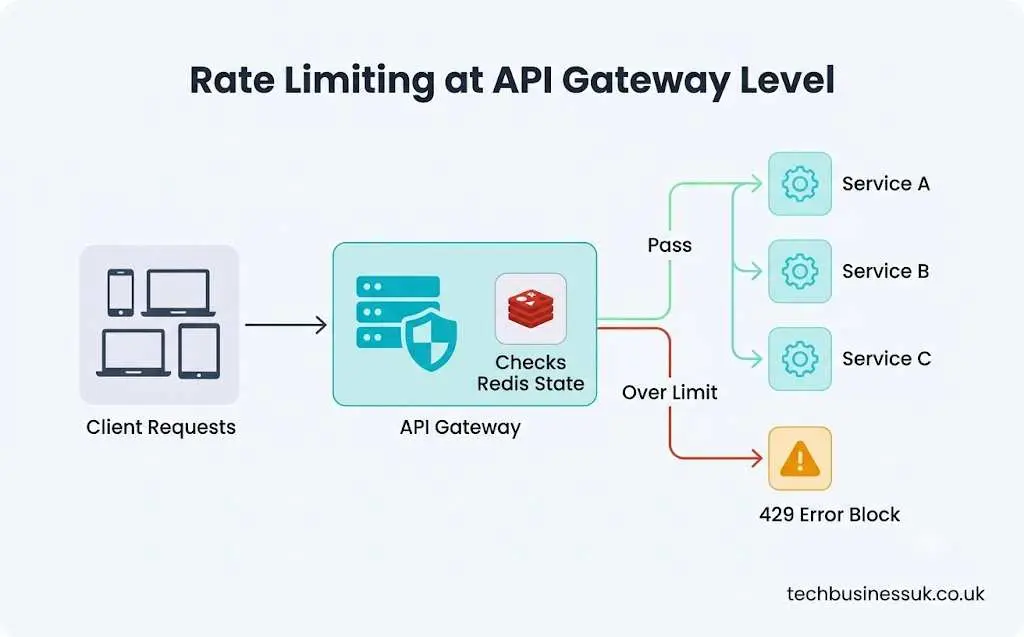
Executing rate limit logic inside your core application backend wastes CPU cycles on requests that ultimately get rejected. Handling api gateway rate limiting at your perimeter stops unwanted traffic before it reaches downstream microservices.
An API Gateway sits in front of your internal topology, providing a unified enforcement point for authentication, telemetry, and traffic control.
Popular API Gateways Supporting Rate Limiting
- AWS API Gateway: Built-in support for usage plans, API keys, and bucket metrics (throttling and burst caps).
- Kong Enterprise: Offers plugin architectures supporting sliding window implementations using local memory or Redis clusters.
- NGINX / NGINX Plus: Provides
limit_req_zonedirectives utilizing leaky bucket algorithms at the reverse-proxy layer. - Cloudflare Enterprise: Executes edge-level rate limiting, filtering traffic long before it arrives at your origin servers.
Enforcing limits at the gateway shield microservices from cascading resource consumption, isolating your underlying infrastructure from upstream spikes.
Rate Limiting in Distributed Systems with Redis
When operating a horizontally scaled API across multiple application instances, local in-memory counters fail. Client Request 1 might hit Instance A, and Client Request 2 might hit Instance B. Without shared state, a user can bypass rate limits by distributing calls across your nodes.
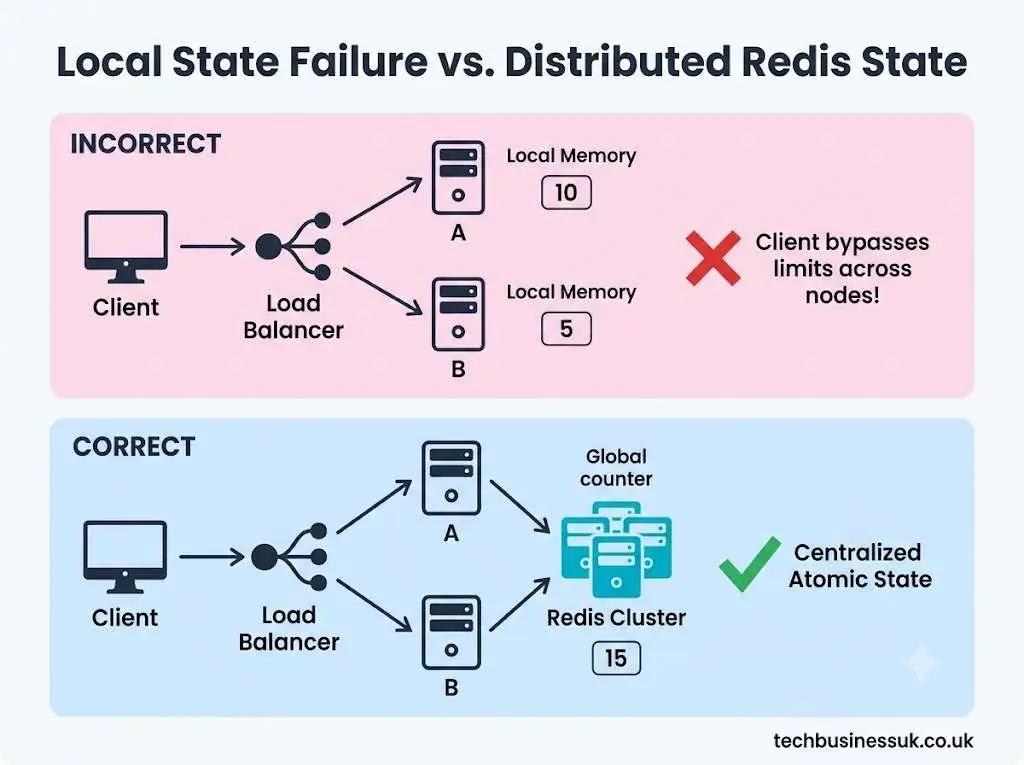
Implementing distributed rate limiting redis patterns provides atomic counters, low sub-millisecond lookups, and key expiration (TTL) out of the box.
Pattern 1: Fixed Window with Redis (INCR + EXPIRE)
Here is a standard api rate limiting implementation using basic Redis primitives:
Python
import redis
import time

r = redis.Redis(host='localhost', port=6379, db=0)

def is_rate_limited_fixed_window(user_id: str, limit: int = 100, window_seconds: int = 60) -> bool:
    current_window = int(time.time() // window_seconds)
    key = f"rate_limit:{user_id}:{current_window}"

    # Atomic increment operation
    current_requests = r.incr(key)

    # Set expiration on the first request in the window
    if current_requests == 1:
        r.expire(key, window_seconds)

    return current_requests > limit
Warning: While simple, basic INCR/EXPIRE setups suffer from boundary burst vulnerabilities.
Pattern 2: Sliding Window Log with Redis Sorted Sets (ZSET)
For precision enforcement across distributed environments, use a Redis Sorted Set. Timestamps serve as scores and members.
Python
import redis
import time
import uuid

r = redis.Redis(host='localhost', port=6379, db=0)

def is_rate_limited_sliding_window(user_id: str, limit: int = 100, window_seconds: int = 60) -> bool:
    now = time.time()
    clear_before = now - window_seconds
    key = f"rate_limit_zset:{user_id}"
    request_id = str(uuid.uuid4())

    pipe = r.pipeline()
    # Remove logs outside the current sliding window
    pipe.zremrangebyscore(key, 0, clear_before)
    # Add current request timestamp
    pipe.zadd(key, {request_id: now})
    # Count total requests in current window
    pipe.zcard(key)
    # Refresh TTL on the key to clean up inactive users
    pipe.expire(key, window_seconds + 1)

    results = pipe.execute()
    total_requests_in_window = results[2]

    return total_requests_in_window > limit
This pattern guarantees strict boundary calculations across distributed nodes.
Rate Limiting as a Security Tool
While rate limiting is essential for capacity management, it also serves as a frontline security defense. Combining enforcement policies with api rate limiting and threat detection tools hardens your endpoints against multiple vector attacks:
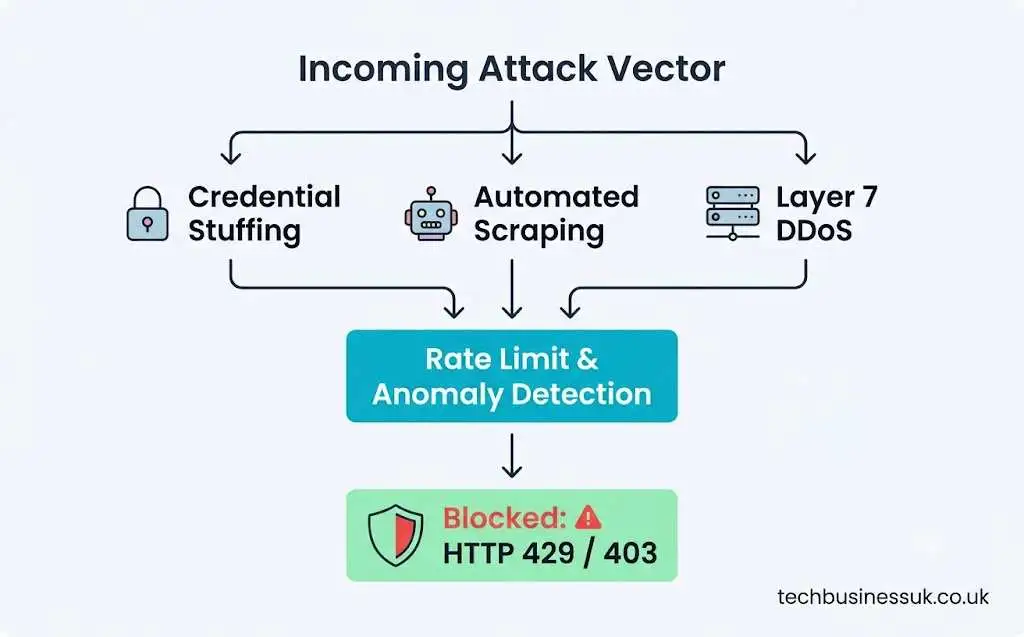
- Credential Stuffing & Brute Force Attacks: Rejection boundaries placed on authentication routes (
/api/v1/auth/login) stop automated dictionary tools from trying thousands of password combinations. - Data Scraping: Restricting read operations stops unauthorized scraping bots from harvesting proprietary data.
- Layer 7 DDoS Mitigation: Drops high-velocity traffic spikes before backend workers exhaust memory or thread pools.
Integrating rate limiters alongside modern api security tools provides deep observability into abnormal request spikes, allowing teams to trigger automated IP blocks or challenge suspected bots with CAPTCHAs.
Step-by-Step Rate Limiting Implementation
Follow this rate limiting step sequence when launching api rate limiting in production:
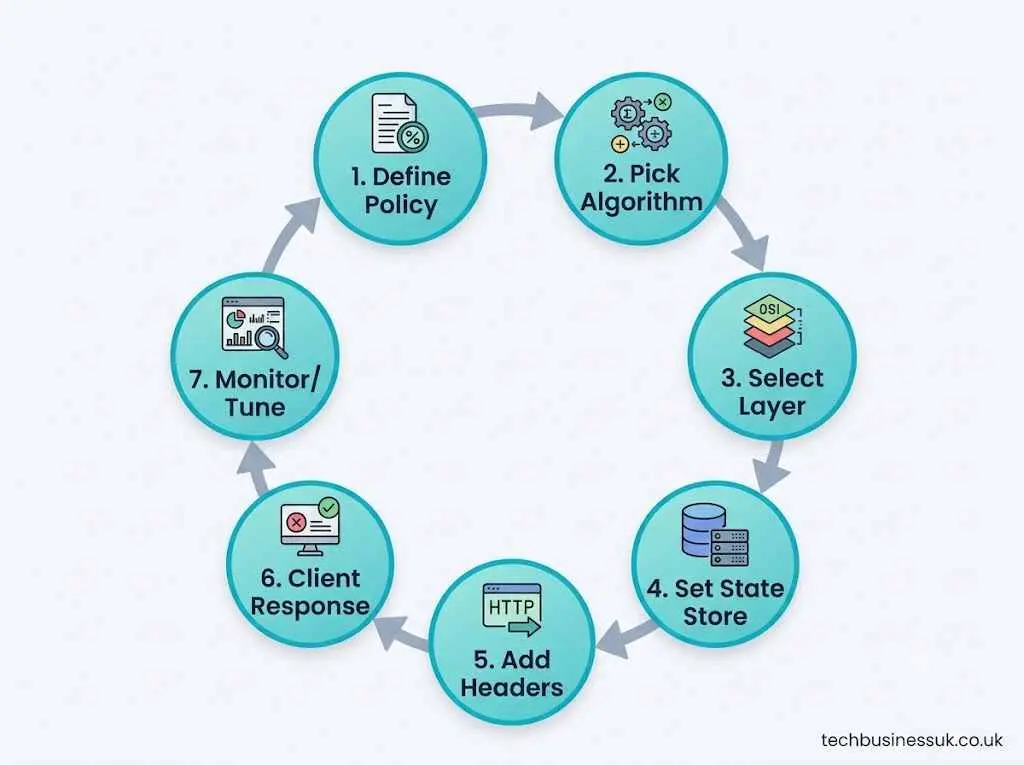
Step 1: Define Your Policy
Determine tier boundaries. For instance:
- Anonymous Users: 10 requests / minute per IP.
- Authenticated Free Tier: 100 requests / minute per User ID.
- Enterprise Tier: 5,000 requests / minute per Organization ID.
Step 2: Select Your Algorithm
Choose Sliding Window Counter or Token Bucket based on your architecture requirements.
Step 3: Choose Enforcement Location
Deploy limits at your API Gateway or reverse-proxy layer whenever possible to drop bad traffic early.
Step 4: Configure Distributed Memory
Provision an in-memory datastore like Redis to share state across nodes.
Step 5: Return Standard Response Headers
Provide clients with real-time rate limit visibility using standardized HTTP headers:
HTTP
X-RateLimit-Limit: 100
X-RateLimit-Remaining: 23
X-RateLimit-Reset: 1717180860
Step 6: Handle 429 Rejections Cleanly
Return an explicit JSON payload explaining the rejection alongside a standard Retry-After header.
Step 7: Monitor and Refine
Track rate limit hit counts to evaluate whether thresholds are set appropriately for legitimate users.
Code Implementation: FastAPI Rate Limiting Middleware
Here is a ready-to-use FastAPI implementation using custom middleware and Redis:
Python
from fastapi import FastAPI, Request, Response, status
from fastapi.responses import JSONResponse
import redis
import time

app = FastAPI(title="Production API")
r = redis.Redis(host="localhost", port=6379, db=0)

RATE_LIMIT = 100  # Max requests
WINDOW_SIZE = 60  # Window size in seconds

@app.middleware("http")
async def rate_limit_middleware(request: Request, call_next):
    # Fallback to IP address if unauthenticated
    client_identifier = request.headers.get("X-API-KEY") or request.client.host
    current_time = int(time.time())
    current_window = current_time // WINDOW_SIZE

    key = f"rate:{client_identifier}:{current_window}"

    # Increment counter atomically
    request_count = r.incr(key)
    if request_count == 1:
        r.expire(key, WINDOW_SIZE)

    ttl = r.ttl(key)
    reset_timestamp = current_time + (ttl if ttl > 0 else WINDOW_SIZE)

    # Enforce limit check
    if request_count > RATE_LIMIT:
        headers = {
            "Retry-After": str(ttl),
            "X-RateLimit-Limit": str(RATE_LIMIT),
            "X-RateLimit-Remaining": "0",
            "X-RateLimit-Reset": str(reset_timestamp)
        }
        return JSONResponse(
            status_code=status.HTTP_429_TOO_MANY_REQUESTS,
            content={"error": "rate_limit_exceeded", "message": "Rate limit exceeded. Retry later."},
            headers=headers
        )

    response: Response = await call_next(request)
    response.headers["X-RateLimit-Limit"] = str(RATE_LIMIT)
    response.headers["X-RateLimit-Remaining"] = str(max(0, RATE_LIMIT - request_count))
    response.headers["X-RateLimit-Reset"] = str(reset_timestamp)
    return response
How to Test Rate Limiting
Deploying rate limits without verification exposes your architecture to silent failures. You must validate your rate-limiting implementation under simulated load using specialized api testing tools.
                +---------------------------------+
                |    Load Generator (k6)  |
                +---------------------------------+
                                |
                   (Fires 150 Reqs / 60 Secs)
                                |
                                v
                +---------------------------------+
                |          API Endpoint           |
                +---------------------------------+
                 /                               \
       (First 100 Requests)             (Next 50 Requests)
                |                                 |
                v                                 v
        [ HTTP 200 OK ]               [ HTTP 429 REJECTED ]
      (Assert: Success)             (Assert: Header Correct)
Critical Test Cases
- Threshold Boundary Verification: Verify that request #100 returns
200 OKwhile request #101 immediately receives a429 Too Many Requests. - Window Expiration & Reset: Send 101 requests to trigger a block, wait for the window to expire, and confirm that request #102 succeeds.
- Header Accuracy Check: Assert that
X-RateLimit-Remainingdecrements properly with each call and matches response payloads. - Concurrent Race Condition Validation: Fire concurrent requests across multiple client threads to confirm atomic Redis increments prevent limit breaches.
Example Automated k6 Test Script
JavaScript
import http from 'k6/http';
import { check, sleep } from 'k6';

export const options = {
  vus: 10,        // 10 virtual users
  duration: '10s', // Run burst traffic for 10 seconds
};

export default function () {
  const url = 'http://api.target.com/v1/resource';
  const params = {
    headers: {
      'X-API-KEY': 'test_client_key_001',
    },
  };

  const res = http.get(url, params);

  // Verify rate limiter behavior
  check(res, {
    'status is 200 or 429': (r) => r.status === 200 || r.status === 429,
    'has rate limit headers': (r) => r.headers['X-Ratelimit-Limit'] !== undefined,
    'retry-after present on 429': (r) => r.status !== 429 || r.headers['Retry-After'] !== undefined,
  });

  sleep(0.05); // Short pause to maintain burst throughput
}
5 Common Rate Limiting Pitfalls
Even senior technical architects hit friction points when deploying rate-limiting policies. Watch out for these common implementation mistakes:
❌ P1: Overly Strict Caps      --> Drops legitimate business traffic
❌ P2: Single IP Keying         --> Blocks thousands of users behind NAT / Gateways
❌ P3: Missing Retry-After     --> Causes clients to retry blindly without slowing down
❌ P4: In-Memory Instance Logs --> Allows users to bypass limits on multi-node setups
❌ P5: Unmonitored Limits      --> Leaves teams blind to active attacks or misconfigurations
1. Setting Limits Too Aggressively
Imposing strict caps without analyzing baseline user metrics will drop legitimate client calls, degrading user experience and breaking partner integrations.
2. Keying Limits Solely by IP Address
Restricting access purely by Remote-Addr penalizes corporate users, university campuses, or mobile subscribers accessing your platform behind shared Network Address Translation (NAT) gateways.
Fix: Key access limits on API Keys or JWT Tenant IDs for authenticated routes, reserving IP-based limits for unauthenticated endpoints.
3. Omitting Retry-After Headers
Returning an HTTP 429 without instructing the client when to retry forces developer integration teams to guess, often resulting in aggressive polling loops that perpetuate service outages.
4. Relying on Local In-Memory Storage in Scaled Clusters
Using local memory stores in distributed environments allows clients to bypass rate limits by balancing requests across nodes. Always centralize state tracking using a datastore like Redis.
5. Neglecting Rate-Limit Telemetry
If you aren’t monitoring HTTP 429 response spikes in your dashboards, you won’t know whether your limits are blocking malicious attacks or crashing legitimate partner integrations.
Real-World Failure: When Rate Limiting Was Missing
The consequences of neglecting rate limiting aren’t theoretical—they lead to major operational outages.
Scenario: The Regional Healthcare System Patient Portal Crash
During a sudden seasonal flu spike, a regional public healthcare network opened an emergency online booking portal. The service integrated a modern frontend web application with legacy backend databases containing patient health records.
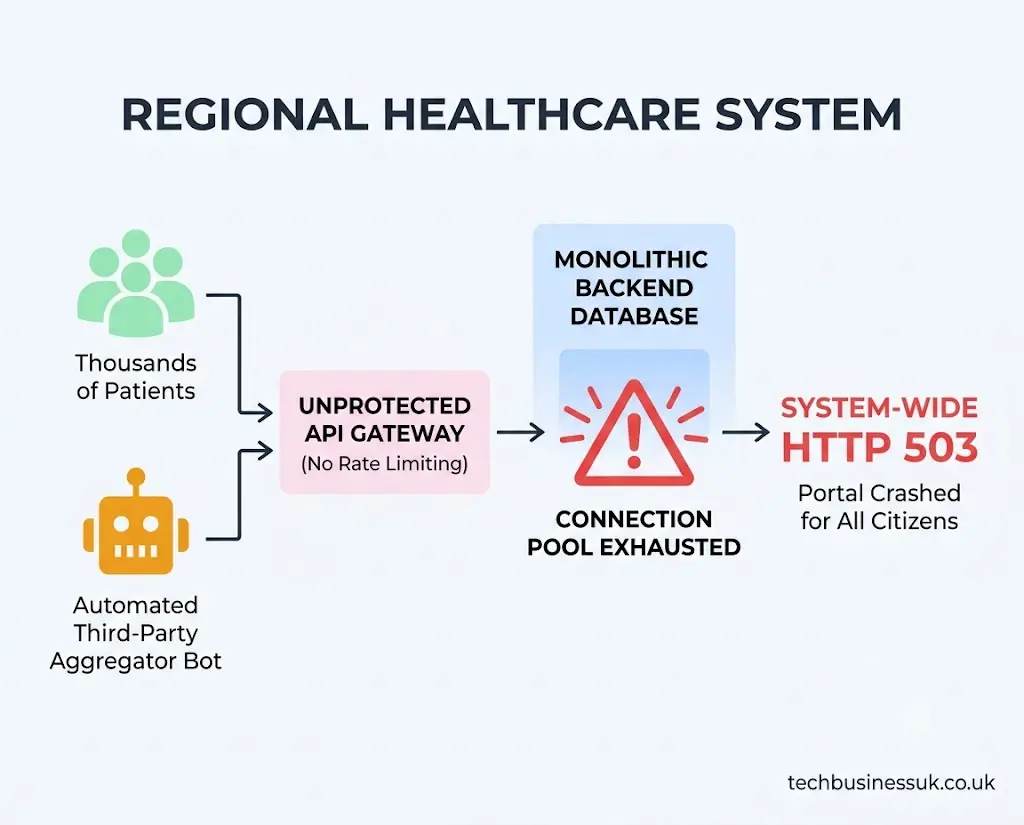
To help citizens find open appointment slots, an independent developer built an automated tracking bot. The bot scraped the public /api/v1/slots endpoint every 200 milliseconds, running thousands of requests a minute to monitor changes across every provider in the region.
Because the system lacked an api rate limiting implementation, the gateway passed every request directly to the monolithic backend. Within 20 minutes:
- The third-party bot consumed 82% of all available database execution threads.
- Response latencies climbed from 150ms to 45 seconds.
- The main application server ran out of available connections, triggering widespread HTTP 503 Service Unavailable errors for citizens attempting to schedule appointments.
The Resolution
Engineering teams deployed edge-level api gateway rate limiting using a Sliding Window Counter algorithm backed by Redis:
- Unauthenticated public endpoints were capped at 5 requests per minute per IP.
- Authenticated patient profiles received a cap of 30 requests per minute.
HTTP
HTTP/1.1 429 Too Many Requests
Retry-After: 60
X-RateLimit-Limit: 5
X-RateLimit-Remaining: 0

{
  "error": "rate_limit_exceeded",
  "message": "Public search limit reached. Please wait 60 seconds."
}
The rate limiter dropped the automated bot’s traffic at the perimeter, keeping backend connection pools healthy and restoring portal availability for all citizens.
API Rate Limiting Best Practices
Follow these battle-tested api rate limiting best practices when designing your traffic-shaping pipeline:
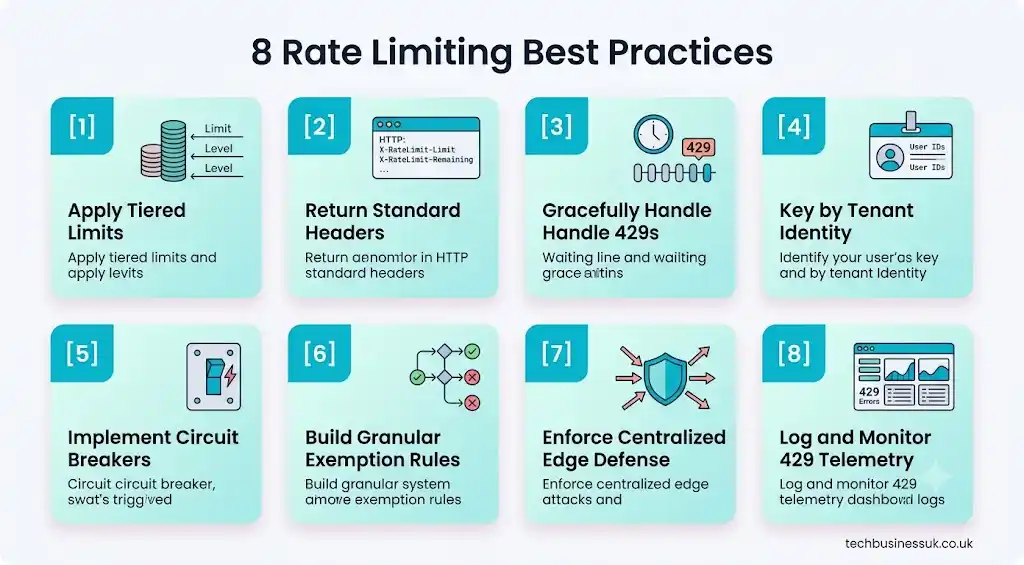
- Enforce Tiered Rate Limits: Segment your limits based on user identity (e.g., Free vs. Paid vs. Enterprise).
- Return Standard Header Data: Always include
X-RateLimit-Limit,X-RateLimit-Remaining, andX-RateLimit-Resetin API responses. - Handle Rejections Gracefully: Include clear
Retry-Aftermetrics in your429response payloads so clients know when to resume requests. - Key by Tenant Identity, Not IP: Use API keys, client IDs, or JWT tokens to track usage accurately across shared networks.
- Combine Rate Limiting with Circuit Breakers: Pair rate limiters with upstream circuit breakers to drop downstream calls when backend dependencies degrade.
- Support Granular Exemption Rules: Build flexibility to temporarily bypass or adjust limits for key enterprise clients during planned high-volume events.
- Enforce Protections at the Edge: Process rate checks at your API Gateway or reverse-proxy layer to shield application nodes from unnecessary load.
- Monitor 429 Telemetry Continuously: Set up real-time alerts to flag unusual spikes in rate limit rejections, exposing misconfigured integration scripts and ongoing attacks early.
Rate Limiting Decision Matrix
Use this matrix to match your application scenario with the right rate-limiting deployment strategy:
| Operational Scenario | Primary Architecture Goal | Recommended Enforcement Layer | Recommended Algorithm | Recommended Keying Strategy |
|---|---|---|---|---|
| Public Unauthenticated API | Prevent DDoS & scraping | Edge Gateway / Reverse Proxy | Fixed Window or Sliding Counter | Client IP Address |
| Multi-Tenant SaaS Platform | Ensure fair usage across pricing tiers | API Gateway | Token Bucket | Authenticated User / Account ID |
| High-Volume Financial Trading | Strict boundary enforcement | Application Layer Middleware | Sliding Window Log | API Key + Session ID |
| Asynchronous Job Processing | Protect downstream database resources | Message Queue Consumer | Leaky Bucket | Worker / Tenant ID |
| Third-Party Partner Webhooks | Prevent sudden burst congestion | API Gateway | Sliding Window Counter | Partner Organization ID |
Conclusion
API rate limiting is a fundamental architectural requirement for modern software platforms. Without clear consumption limits, your system remains exposed to unexpected outages, cascading microservice failures, and expensive resource overages.
Treating rate limits as a core non-functional requirement ensures your applications balance developer velocity with continuous operational resilience.
Deploy your limits early at the API gateway layer, use atomic distributed memory stores like Redis, return clear standardized response headers, and continuously test your boundaries using modern API testing tools to keep your platforms fast, secure, and available.
Frequently Asked Questions
What is API rate limiting?
API rate limiting is a control mechanism that restricts the number of API requests a user or client can make within a specified timeframe. It protects backends from overload, ensures fair resource sharing, and mitigates DDoS attacks.
What is the difference between rate limiting and throttling?
Rate limiting sets a hard request ceiling over a time window, dropping excess traffic with HTTP 429 errors. Throttling is a dynamic traffic-shaping technique that delays or queues excess requests to smooth out traffic spikes without dropping them immediately.
What does 503 rate limiting mean?
An HTTP 503 error means “Service Unavailable”—indicating that your backend infrastructure or database was overwhelmed and crashed. Proper rate limiting should intercept excess traffic before a crash and return an HTTP 429 “Too Many Requests” status code instead.
What are the main rate limiting algorithms?
The five primary algorithms are Token Bucket, Leaky Bucket, Fixed Window Counter, Sliding Window Log, and Sliding Window Counter. Token Bucket and Sliding Window Counter are the most widely used in modern web APIs.
How do I implement rate limiting in a distributed system?
In a distributed system, use a centralized, low-latency datastore like Redis to maintain atomic counters across nodes. This ensures that a client cannot bypass rate limits by distributing requests across multiple application servers.
What headers should I return when an API is rate limited?
You should return X-RateLimit-Limit (max allowed), X-RateLimit-Remaining (calls left), X-RateLimit-Reset (time until reset), and a Retry-After header indicating how many seconds the client must wait before trying again.
How do I test API rate limiting?
Test rate limiting using automated load testing tools like k6, Apache JMeter, or Locust. Execute test scripts that intentionally exceed your request thresholds to verify that the API returns HTTP 429 status codes, correct headers, and expected Retry-After values.
About the Author





2 thoughts on “API Rate Limiting: The Complete Guide to Throttling, Quotas, and Best Practices (2026)”