TL;DR Summary
- Authentication (AuthN) validates who a user is using credentials like passwords, biometrics, or signed tokens. It returns a verified user identity.
- Authorization (AuthZ) determines what an authenticated user can do by evaluating permissions, roles, or attributes against specific resources.
- HTTP Error Codes: A failure in authentication yields an
HTTP 401 Unauthorizedstatus, whereas a failure in authorization returns anHTTP 403 Forbiddenstatus. - Protocols & Standards: OpenID Connect (OIDC) handles identity verification (AuthN), while OAuth 2.0 governs delegated resource permissions (AuthZ).
- Modern Architectures: Enterprise microservices offload identity checks to an API gateway while delegating granular access control decisions to policy engines like Open Policy Agent (OPA).
Production outages, silent data leaks, and critical security breaches rarely happen because an enterprise forgot to set up a login page. They occur when an engineering team passes a valid user token through an API endpoint and mistakenly assumes that identity guarantees permission. A user logs in smoothly, receives a valid JSON Web Token (JWT), and proceeds to read, modify, or delete administrative resources simply because the backend service verified who they were without checking what they were allowed to touch.
This architectural flaw represents the fundamental danger of confusing authentication vs authorization.
When building cloud-native APIs, microservices, and multi-tenant SaaS applications, mixing up identity verification with permission management creates catastrophic security blind spots. Developers regularly struggle to separate user identity from resource access, leading to vulnerabilities like Broken Object Level Authorization (BOLA) and privilege escalation. Understanding the exact boundaries of authentication vs authorization is not merely a theoretical exercise—it is an absolute prerequisite for engineering resilient, zero-trust software systems.
Whether you are designing a greenfield microservices backend, configuring OAuth 2.0 scopes, or conducting comprehensive testing with modern api security testing tools, mastering the distinction between these two concepts protects your applications from data exposure and systemic failure.
1. Core Definitions: Deconstructing Identity vs Permissions
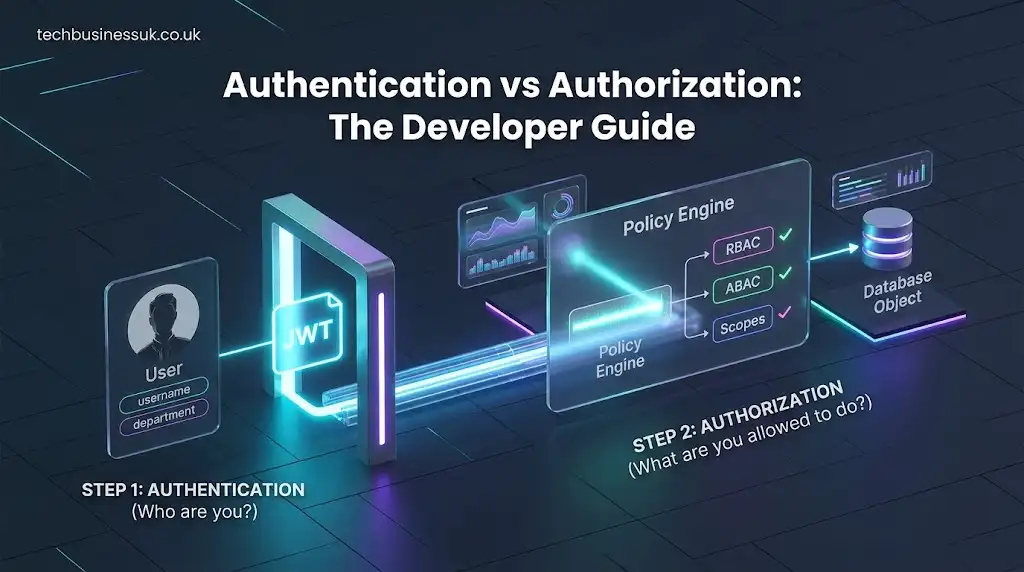
To build secure software systems, you must draw a hard line between identity verification and permission enforcement. The phrase auth vs authz explained simply comes down to two sequential questions: Who are you? and What are you allowed to do?
+-----------------------------------------------------------------------+
|                           INCOMING REQUEST                            |
+-----------------------------------------------------------------------+
                                    |
                                    v
+-----------------------------------------------------------------------+
|                    STEP 1: AUTHENTICATION (AuthN)                     |
|  Question: "Who are you?"                                             |
|  Mechanism: Passwords, OTPs, WebAuthn, JWT Signature Check            |
|  Outcome: Returns Verified Identity (e.g., User ID: 8942)            |
+-----------------------------------------------------------------------+
                                    |
                                    v
+-----------------------------------------------------------------------+
|                    STEP 2: AUTHORIZATION (AuthZ)                      |
|  Question: "What are you allowed to do?"                              |
|  Mechanism: RBAC, ABAC, Scopes, Policy Rules                         |
|  Outcome: ALLOW or DENY Access to Resource                            |
+-----------------------------------------------------------------------+
What is Authentication (AuthN)?
Authentication is the process of verifying the claimed identity of a user, system, or software agent. When an entity attempts to access a network or application, authentication challenges the entity to prove its identity using one or more credential factors across modern api authentication methods.
In modern web applications, authentication precedes every other interaction. It ensures that the incoming request originates from a legitimate source. Once the system validates the supplied credentials—whether through password hashing checks, asymmetric cryptographic signatures, or multi-factor challenges—it establishes an authenticated session or issues a signed security token containing identity claims.
Key characteristics of authentication include:
- Identity Determination: It answers who is making the request.
- Credential Validation: It relies on knowledge factors (passwords), possession factors (security keys, authenticator apps), or inherence factors (fingerprints, facial recognition), often structured around standards like the NIST Digital Identity Guidelines (SP 800-63).
- Token Issuance: Upon success, it generates an identity context, such as an ID token or session cookie.
- User-Centric: It centers entirely on validating proof of identity rather than evaluating target resources.
What is Authorization (AuthZ)?
Authorization is the process of determining whether an authenticated entity possesses the required privileges to perform a specific action on a target resource. Authentication verifies who you are; authorization dictates what actions you can take.
Even if a user proves their identity beyond a shadow of a doubt, authorization evaluates contextual policies, assigned roles, domain constraints, and resource ownership before granting access. Authorization operates continuously throughout an application’s lifecycle, evaluating every API call, database query, and administrative operation.
Key characteristics of authorization include:
- Permission Enforcement: It answers what actions an identity can perform on a specific entity.
- Policy Evaluation: It relies on access control lists (ACLs), role assignments, or dynamic attribute policies.
- Resource-Centric: It evaluates the intersection between the actor, the operation (
CREATE,READ,UPDATE,DELETE), and the requested object. - State & Context Dependency: It incorporates real-time parameters such as IP address, request time, tenant boundary, and ownership flags.
The Fundamental Difference Between Identity and Permission
The difference between identity and permission forms the cornerstone of zero-trust security.
- Identity is a set of static or semi-static attributes that uniquely describe an entity (e.g.,
user_id: 1042,email: alex@company.com,department: Engineering). - Permission, by contrast, is a dynamic rule that defines an interaction boundary between an identity and a system asset (e.g.,
can_read_financial_reports,can_delete_production_database).
Conflating these two constructs leads directly to poor application design and complicates defining both functional vs non functional requirements during architectural planning. For instance, storing hardcoded permission flags directly inside a user’s database record forces engineers to alter user identity schemas whenever application security requirements evolve. Keeping identity distinct from access control allows engineering teams to modify permission matrices without invalidating existing user accounts or breaking active sessions.
Concrete Example: Difference Between Authentication and Authorization
Consider a real-world scenario involving an enterprise cloud platform:
Scenario: An employee named Sarah logs into her company’s SaaS management platform to review monthly infrastructure billing.
- Authentication Phase: Sarah opens the portal, enters her email address and password, and completes a Multi-Factor Authentication (MFA) challenge on her mobile device. The system checks her password hash against the database, validates her TOTP code, and confirms that she is indeed Sarah. Her identity is verified.
- Authorization Phase: Sarah clicks on the “Billing & Invoices” tab. The backend service intercepts her request, reads her user ID, and checks her assigned organization role. The system discovers that while her identity is valid, her assigned role is “Junior Developer”—a role restricted to viewing application logs. The system blocks her from seeing financial data and presents an “Access Denied” notice.
Sarah successfully completed authentication, but she failed authorization for the requested billing resource.
2. Side-by-Side Comparison Matrix
To clearly map out what is authentication and authorization in web development, the table below breaks down their primary attributes, operational boundaries, and technical mechanics:
| Feature / Metric | Authentication (AuthN) | Authorization (AuthZ) |
|---|---|---|
| Primary Question | “Who are you?” | “What are you allowed to do?” |
| Core Objective | Verifying user or client identity. | Enforcing permission policies on resources. |
| Execution Order | Must occur first in the request lifecycle. | Occurs after identity is established. |
| Data Handled | Credentials, Passwords, Biometrics, ID Tokens. | Roles, Permissions, Scopes, Attributes, Policies. |
| Standard Protocols | OpenID Connect (OIDC), SAML 2.0, WebAuthn. | OAuth 2.0, XACML, Open Policy Agent (OPA). |
| Data Carrier | OIDC ID Tokens, SAML Assertions, Session IDs. | OAuth 2.0 Access Tokens, Scopes, RBAC/ABAC tables. |
| HTTP Error Status | 401 Unauthorized | 403 Forbidden |
| Change Frequency | Low (User logs in once per session). | High (Evaluated continuously per API request). |
| User Visibility | Highly visible (Login forms, MFA prompts). | Completely transparent (Backend evaluation). |
| Failure Result | Login rejected; prompt user to re-authenticate. | Access denied; user identity remains intact. |
3. How AuthN and AuthZ Work in Web Development & APIs
Understanding implementing authentication and authorization in modern APIs requires tracing the full journey of a web request through front-end components, edge gateway proxies, and backend microservice networks.
+--------------+               +-----------------+               +-------------------+
| Client App   |               | API Gateway     |               | Microservice / DB |
| (SPA/Mobile) |               | (Edge Proxy)    |               | (Resource Server) |
+--------------+               +-----------------+               +-------------------+
       |                                |                                  |
       |--- 1. POST /login ------------>|                                  |
       |    (Credentials)               |                                  |
       |<-- 2. Returns Signed JWT ------|                                  |
       |    (Identity Established)      |                                  |
       |                                |                                  |
       |--- 3. GET /api/v1/orders ------|                                  |
       |    (Header: Bearer JWT)        |                                  |
       |                                |--- 4. Validate Token ------------|
       |                                |    Signature (AuthN)             |
       |                                |                                  |
       |                                |--- 5. Check Scopes & ------------|
       |                                |    RBAC Policies (AuthZ)         |
       |                                |                                  |
       |                                |--- 6. Forward Authorized ------->|
       |                                |    Request                       |
       |<-- 7. 200 OK + Data -----------|<---------------------------------|
When a user opens a modern single-page application (SPA) or mobile client:
- Identity Handshake (AuthN): The client sends user credentials over TLS to an authentication server. Upon successful validation, the server returns an identity artifact—typically an asymmetric JSON Web Token (JWT) or a secure,
HttpOnlysession cookie. - Request Dispatch: For subsequent interactions, the client attaches this credential (e.g., an
Authorization: Bearer <token>header) to every outgoing HTTP request. - Edge Gateways & Identity Parsing: The incoming request hits an edge proxy or API Gateway. The gateway decrypts or parses the token, checks its cryptographic signature against a public key set (JWKS), verifies the expiration timestamp (
exp), and asserts that the client’s identity is genuine. - Permission Gatekeeping (AuthZ): Once identity is confirmed, the system passes the request payload along with the user’s claims to an access control layer. This layer checks whether the user’s role or assigned scopes permit them to execute the requested HTTP method (
GET,PUT,DELETE) on the targeted URI path. - Upstream Execution: If permission checks pass, the backend executes the operation and returns a
200 OKresponse. If permission checks fail, the system drops the request immediately at the gatekeeper level.
4. Architectural Patterns: Microservices & Cloud-Native Security
When shifting from monolithic applications to microservices, traditional session-based access control breaks down. Managing identity across dozens or hundreds of independent services requires choosing between stateless authentication vs centralized authorization architectures.
The API Gateway Pattern
In cloud-native microservices architectures, placing identity logic inside every individual service creates massive code duplication and maintenance hazards. The recommended pattern offloads initial authentication checks to a centralized api gateway.
                     +---------------------------------------+
                     |             API GATEWAY               |
                     |  - Validates JWT Signatures           |
                     |  - Enforces Rate Limits               |
                     |  - Terminates TLS                     |
                     +---------------------------------------+
                                         |
               +-------------------------+-------------------------+
               | (Passes Validated User Claims in Headers)        |
               v                                                   v
+-----------------------------+                     +-----------------------------+
|    Order Microservice       |                     |    Payment Microservice     |
| - Evaluates Order Policies  |                     | - Evaluates Payment Rules   |
| - Fine-Grained AuthZ        |                     | - Fine-Grained AuthZ        |
+-----------------------------+                     +-----------------------------+
- Edge Authentication: The API Gateway validates incoming JWT tokens, handles TLS termination, and drops unauthenticated traffic before it ever touches your internal service mesh.
- Context Propagation: Upon validating a token, the gateway strips sensitive credentials and injects standardized user headers (e.g.,
X-User-Id: 8942,X-User-Roles: Admin) into internal HTTP requests. - Decentralized Authorization: Internal microservices receive clean, pre-authenticated requests containing validated user claims. Each microservice then enforces its own domain-specific, fine-grained authorization logic without needing to re-authenticate the user.
5. Protocols & Standards: OAuth 2.0, OIDC, SAML, and JWT
Developers often struggle with standards like OAuth 2.0, OpenID Connect (OIDC), and SAML, frequently misapplying them in security designs.
+-----------------------------------------------------------------------------------+
|                            OPENID CONNECT (OIDC)                                  |
|  - Purpose: AUTHENTICATION (AuthN)                                                |
|  - Core Artifact: ID Token (JWT)                                                  |
|  - Answers: "Who is the user? How did they log in?"                               |
|                                                                                   |
|  +-----------------------------------------------------------------------------+  |
|  |                            OAUTH 2.0                                        |  |
|  |  - Purpose: AUTHORIZATION (AuthZ)                                           |  |
|  |  - Core Artifact: Access Token                                              |  |
|  |  - Answers: "What resources can this client access on behalf of the user?"    |  |
|  +-----------------------------------------------------------------------------+  |
+-----------------------------------------------------------------------------------+
OAuth 2.0 vs OpenID Connect (OIDC)
The single most common mistake in protocol design is using OAuth 2.0 for user authentication.
- OAuth 2.0 is an AUTHORIZATION framework. Defined in the IETF OAuth 2.0 Specification (RFC 6749), it was designed exclusively to allow a third-party application to obtain limited access to an HTTP service on behalf of a resource owner. OAuth 2.0 issues Access Tokens that represent delegated permissions—it does not provide identity verification by itself.
- OpenID Connect (OIDC) is an AUTHENTICATION layer built directly on top of OAuth 2.0. OIDC extends OAuth 2.0 by introducing the ID Token, a cryptographically signed JSON Web Token (JWT) containing standard claims about the authenticated user (such as
sub,iss,auth_time, andemail).
When evaluating OAuth 2.0 authentication vs authorization, remember: OIDC tells your application who the user is, while OAuth 2.0 scopes define what access the client application has been granted.
SAML 2.0
Security Assertion Markup Language (SAML 2.0) is an XML-based federated identity standard used heavily in enterprise Single Sign-On (SSO) environments. Unlike modern JSON-based protocols, SAML relies on heavy XML signatures and assertions passed between an Identity Provider (IdP) and a Service Provider (SP). SAML handles both authentication (verifying corporate identity) and coarse-grained authorization (passing group membership attributes).
Understanding JWT for Authentication vs Authorization
JSON Web Tokens (JWT) are stateless, cryptographically signed data structures used across web systems. A common architectural question is how to balance JWT for authentication vs authorization:
+-----------------------------------------------------------------------------------+
|                             JSON WEB TOKEN (JWT)                                  |
+-----------------------------------------------------------------------------------+
|  HEADER: Algorithm & Token Type                                                   |
|  { "alg": "RS256", "typ": "JWT" }                                                 |
+-----------------------------------------------------------------------------------+
|  PAYLOAD: Claims (AuthN + AuthZ)                                                  |
|  {                                                                                |
|    "sub": "usr_984210",              <-- AuthN: Who is the user?                  |
|    "email": "alex@company.com",      <-- AuthN: User identity attribute           |
|    "roles": ["editor", "finance"],   <-- AuthZ: Assigned roles                    |
|    "scopes": ["read:reports"]        <-- AuthZ: Delegated permissions             |
|  }                                                                                |
+-----------------------------------------------------------------------------------+
|  SIGNATURE: Asymmetric Cryptography                                              |
|  RS256HeaderAndPayloadSignature...                                                |
+-----------------------------------------------------------------------------------+
- JWT as an Authentication Carrier (ID Token): In an OIDC flow, the ID Token is a JWT that contains identity assertions. The client application parses and verifies this token to confirm the user’s login state.
- JWT as an Authorization Credential (Access Token): In API ecosystems, the Access Token is a JWT containing bearer token authentication vs scope authorization claims. When a client passes this JWT in the
Authorizationheader, the backend API reads the embeddedscopesarray orrolesclaim to approve or block requested API actions.
6. Access Control Models: RBAC, ABAC, ReBAC, and ACLs
Once identity is verified, your application must evaluate permission logic using a structured access control model. Selecting the right model prevents authorization logic from turning into unmaintainable spaghetti code.
+-----------------------------------------------------------------------------------+
|                           ACCESS CONTROL EVOLUTION                                |
+-----------------------------------------------------------------------------------+
|  1. ACL  (Access Control Lists)  --> Explicit list attached directly to resources.|
|  2. RBAC (Role-Based)            --> Users -> Roles -> Permissions.               |
|  3. ABAC (Attribute-Based)       --> Rules based on User, Resource, & Context.    |
|  4. ReBAC (Relationship-Based)   --> Permissions derived from graph relations.    |
+-----------------------------------------------------------------------------------+
Role-Based Access Control (RBAC)
RBAC assigns permissions to discrete roles (e.g., Admin, Editor, Viewer), and users are assigned one or more roles.
- Best for: Applications with static organizational hierarchies and clearly defined user functions.
- Limitation: Role Explosion. As system requirements grow, you end up creating dozens of hyper-specific roles (
BillingEditor,RegionalBillingEditor,ReadOnlyBillingEditor).
Attribute-Based Access Control (ABAC)
ABAC evaluates dynamic boolean policies based on combinations of attributes:
- Subject attributes: User role, department, clearance level.
- Resource attributes: File sensitivity, document owner, project tag.
- Action attributes:
read,write,approve,delete. - Environmental attributes: Current time, request location, device compliance status.
When comparing Role Based Access Control vs Attribute Based Access Control, ABAC offers far greater flexibility. It easily handles contextual conditions—such as allowing a user to access financial files only during business hours while connected to the company VPN.
Relationship-Based Access Control (ReBAC)
Popularized by Google’s Zanzibar paper, ReBAC derives permissions from relationships between entities in a graph. For example: “User X can edit Document Y because User X is a member of Team Z, which owns Folder W, which contains Document Y.”
- Best for: Multi-tenant SaaS products, social networks, and file-sharing applications (e.g., Google Drive, Figma) where permissions depend on nested organizational hierarchies.
Access Control Lists (ACLs)
ACLs attach permission tables directly to individual objects. A database record might explicitly store a list of allowed user IDs alongside the actions each user can perform (User_102: READ, User_405: WRITE).
- Limitation: ACLs do not scale well in enterprise settings because revoking a user’s access requires scanning every single object across the entire database.
7. HTTP Status Codes: 401 Unauthorized vs 403 Forbidden
Properly signaling auth failures through standard HTTP status codes is essential for client applications to handle errors correctly.
                                INCOMING HTTP REQUEST
                                          |
                                          v
                            Is identity token valid?
                                   /     \
                             NO   /       \   YES
                                 v         v
                      +------------------+  Is user permitted action?
                      |  401 UNAUTHORIZED|         /          \
                      +------------------+   NO   /            \   YES
                                                 v              v
                                      +-----------------+  +------------+
                                      |  403 FORBIDDEN  |  |   200 OK   |
                                      +-----------------+  +------------+
HTTP 401 Unauthorized (Unauthenticated)
Despite its confusing name, 401 Unauthorized means Unauthenticated. It indicates that the incoming HTTP request lacks valid authentication credentials.
- When to return 401:
- No
Authorizationheader was provided in the request. - The provided JWT token has expired or contains an invalid cryptographic signature.
- The session cookie is missing, corrupt, or cleared.
- No
- Client Action: The client application should prompt the user to log in again, clear invalid local storage tokens, or trigger a silent refresh token exchange.
HTTP 403 Forbidden (Unauthorized)
403 Forbidden means Unauthorized. The server understands who the user is, but the user lacks the required permissions to access the requested resource.
- When to return 403:
- A logged-in Standard User attempts to call a
DELETE /api/v1/users/adminendpoint. - A user attempts to read a database record belonging to a different tenant organization.
- An API client supplies a valid token, but the token lacks the required OAuth scope (
read:billing).
- A logged-in Standard User attempts to call a
- Client Action: The client application should not prompt the user to re-authenticate. Instead, it should display an “Access Denied” message, as re-authenticating with the same credentials will simply yield another 403 error.
8. Common Security Vulnerabilities & How to Prevent Them
Failing to separate identity verification from access control leads to severe, high-visibility security vulnerabilities.
+-----------------------------------------------------------------------------------+
|                          TOP AUTHORIZATION VULNERABILITIES                        |
+-----------------------------------------------------------------------------------+
|  1. BOLA / IDOR   --> Changing object IDs in API requests to read others' data.   |
|  2. BFLA          --> Calling administrative API endpoints as a regular user.    |
|  3. Auth Bypass   --> Exploiting token signature flaws or skipping middleware.    |
+-----------------------------------------------------------------------------------+
Broken Object Level Authorization (BOLA / IDOR)
Broken Object Level Authorization (BOLA), also known as Insecure Direct Object References (IDOR), is consistently ranked as the #1 threat in the OWASP API Security Top 10.
BOLA occurs when an API endpoint exposes an object identifier without verifying that the authenticated user actually owns or has rights to that object.
# VULNERABLE CODE (BOLA / IDOR)
@app.route('/api/v1/invoices/<invoice_id>', methods=['GET'])
@jwt_required()
def get_invoice(invoice_id):
    # AUTHENTICATION IS VALID: User identity is confirmed via JWT
    # BUT AUTHORIZATION IS MISSING: The code never checks if invoice belongs to user!
    invoice = db.query(Invoice).get(invoice_id)
    return jsonify(invoice)
In the vulnerable example above, an attacker logs in legitimately as User A, receives a valid JWT, and then sends requests to /api/v1/invoices/1001, /api/v1/invoices/1002, and /api/v1/invoices/1003. Because the service only checks that the user is logged in (AuthN) without checking resource ownership (AuthZ), User A can read every customer invoice in the database.
Mitigation: Always combine identity assertions with resource ownership checks in your data layer:
# SECURE CODE (Enforcing Ownership-Based AuthZ)
@app.route('/api/v1/invoices/<invoice_id>', methods=['GET'])
@jwt_required()
def get_invoice(invoice_id):
    current_user_id = get_jwt_identity()

    # Enforce AuthZ: Check both the object ID AND the tenant/user ownership
    invoice = db.query(Invoice).filter_by(id=invoice_id, owner_id=current_user_id).first()

        # Return 403 or 404 to prevent resource enumeration
        return jsonify({"error": "Resource not found or access denied"}), 403

    return jsonify(invoice)
Broken Function Level Authorization (BFLA)
BFLA occurs when an application fails to restrict administrative operations to elevated user roles. An attacker simply sends an HTTP DELETE request to an admin path (e.g., /api/v1/admin/users/89), and the backend executes the operation because it verified the token’s validity without checking if the user was an Admin.
Mitigation: Implement explicit, centralized role verification middleware on every administrative route.
Authentication Bypasses & Token Forgery
Authentication bypasses occur when applications misconfigure JWT validation libraries—such as accepting tokens signed with the insecure "alg": "none" header, failing to verify asymmetric public keys, or skipping signature validation entirely in local development environments.
Mitigation: Use battle-tested identity management libraries, enforce strong asymmetric algorithms (such as RS256 or EdDSA), and never trust unverified incoming token payloads.
9. Best Practices Checklist for Developers
To maintain clear boundaries between authentication vs authorization across your applications, apply this engineering checklist:
- $$$$ Enforce Centralized Identity Management: Use dedicated Identity Providers (IdP) or managed OIDC services rather than building custom password hashing engines.
- $$$$ Separate Identity Tokens from Access Tokens: Never use OIDC ID tokens to authorize API requests; reserve ID tokens for identity assertions and use OAuth 2.0 Access Tokens for resource authorization.
- $$$$ Validate JWT Signatures and Expiration strictly: Always verify token signatures using public keys (JWKS) and enforce strict expiration checks (
exp). - $$$$ Enforce Ownership Checks at the Data Layer: Prevent BOLA/IDOR by validating that the authenticated user ID matches the target resource owner ID on every read/write operation.
- $$$$ Return Accurate HTTP Error Codes: Return
401 Unauthorizedfor identity failures and403 Forbiddenfor permission failures to keep client handling logic clean. - $$$$ Adopt Standardized Policy Engines: Offload complex authorization rules to externalized policy engines like Open Policy Agent (OPA) or AWS Verified Permissions rather than embedding nested
if/elsechecks in application code. - $$$$ Audit Scopes and Roles Continuously: Apply the Principle of Least Privilege, ensuring users and API clients are granted only the minimum necessary scopes to perform their duties.
About the Author

2 thoughts on “Authentication vs Authorization: The Definitive Developer & API Security Guide”